

Creating YouTube thumbnails manually can eat up hours of your time and demand design skills you might not have. AI-generated thumbnails increase click-through rates by up to 20%, offering creators a fast path to professional visuals that grab attention. This guide explains how AI thumbnail generators work, why they boost engagement, and how you can use them effectively to grow your channel in 2026.
Table of Contents
- Introduction To AI-Generated Thumbnails
- How AI Generates Thumbnails: Technical Insights
- Impact Of AI Thumbnails On Viewer Engagement And CTR
- Common Misconceptions About AI Thumbnails
- Efficiency And Workflow Benefits Of AI Thumbnail Tools
- Limitations And Tradeoffs Of AI-Generated Thumbnails
- Practical Guide: Using Thumb.nail Generator To Boost Video Performance
- Boost Your YouTube Thumbnails With AI-Generated Designs
- Frequently Asked Questions
Key takeaways
| Point | Details |
|---|---|
| Speed and accessibility | AI thumbnail tools create professional designs in under 30 seconds without requiring graphic design skills. |
| Proven engagement boost | AI-generated thumbnails deliver average CTR increases of 20% compared to manual designs. |
| Technology foundation | Google Gemini AI analyzes video content and applies optimized visual elements automatically. |
| Balance automation with oversight | Human review ensures brand consistency and catches occasional AI inaccuracies. |
| Workflow efficiency | Creators save 5-10 minutes per thumbnail while producing multiple high-quality options rapidly. |
Introduction to AI-generated thumbnails
AI-generated thumbnails are visual designs created or enhanced by artificial intelligence algorithms specifically for YouTube videos. These tools analyze your video content, identify key visual elements, and automatically generate eye-catching thumbnail options that align with proven engagement patterns.
YouTube thumbnails serve as the primary deciding factor for whether viewers click your video or scroll past it. Research shows thumbnails influence up to 90% of initial click decisions on the platform. Despite their importance, many creators struggle with thumbnail creation due to time constraints, limited design experience, or difficulty maintaining visual consistency across their channel.
AI thumbnail generators address these challenges by democratizing access to professional-quality designs. The technology removes traditional barriers like:
- Expensive design software subscriptions
- Years of graphic design training
- Time-consuming manual editing processes
- Inconsistent visual branding across videos
- Limited creative inspiration for new concepts
By automating design processes, AI tools let you focus creative energy on content strategy while the technology handles visual execution. This shift enables creators at any skill level to produce thumbnails that compete with professionally designed alternatives.
How AI generates thumbnails: technical insights
Google Gemini AI uses advanced machine learning to select images, apply styles, and optimize elements automatically. The system processes your video content through multiple analytical layers before generating thumbnail options tailored to your audience.
The AI thumbnail generation process follows three core stages:
- Content analysis: The AI scans your video metadata, extracts key frames, identifies faces and objects, and analyzes text elements to understand your content theme.
- Model processing: Machine learning models trained on millions of high-performing thumbnails apply design principles, color theory, and composition rules to your specific content.
- Thumbnail generation: The system outputs multiple thumbnail variations, each optimized for different audience segments and engagement patterns.
Modern AI thumbnail tools incorporate dynamic audience segmentation, allowing the technology to generate different thumbnail versions for various viewer demographics. This capability means your gaming content might receive vibrant, high-contrast designs while educational content gets cleaner, text-focused layouts.
| Stage | AI Process | Manual Equivalent | Time Saved |
|---|---|---|---|
| Content Analysis | Automatic frame extraction and object detection | Manual video review and screenshot selection | 2-3 minutes |
| Design Application | AI applies color theory and composition rules | Learning design principles and applying manually | 3-5 minutes |
| Variation Creation | Generate 5-10 options instantly | Create multiple versions from scratch | 10-15 minutes |
| Optimization | Test against engagement patterns | A/B testing over weeks | Days/weeks |
The technology balances automation with flexibility by allowing human oversight at critical decision points. You maintain final approval over generated options, can request style adjustments, and add brand-specific elements the AI might miss.
Pro Tip: Upload 3-5 of your best-performing thumbnails to train the AI on your specific brand style and audience preferences before generating new designs.
Impact of AI thumbnails on viewer engagement and CTR
Creators using AI thumbnail tools reported 15% higher viewer engagement and 30% faster creation speed within two weeks. These improvements translate directly to channel growth metrics, making AI thumbnails a valuable asset for creators focused on expanding their audience.

YouTube's recommendation algorithm factors thumbnail performance into video ranking decisions. Videos with higher click-through rates receive more prominent placement in suggested video feeds, search results, and homepage recommendations. This algorithmic preference creates a compounding effect where better thumbnails lead to more visibility, which drives additional clicks and engagement.
| Metric | Manual Thumbnails | AI-Generated Thumbnails | Improvement |
|---|---|---|---|
| Average CTR | 4.2% | 5.0% | +19% |
| Design Time | 8 minutes | 25 seconds | -97% |
| Viewer Engagement | 45% average view duration | 52% average view duration | +15% |
| Thumbnail Variations | 1-2 per video | 5-10 per video | +400% |
The data reveals AI thumbnails consistently outperform manual designs across multiple engagement metrics. The speed advantage alone allows creators to test more thumbnail variations, identify top performers faster, and optimize their visual strategy based on real viewer behavior rather than guesswork.
"AI-generated thumbnails transformed our channel's performance. We saw a 23% CTR increase in the first month and saved over 20 hours of design time, allowing us to focus on creating better content instead of wrestling with Photoshop."
These improvements compound over time as you build a library of high-performing thumbnail styles the AI can reference and refine for future videos.
Common misconceptions about AI thumbnails
Many creators hesitate to adopt AI thumbnail tools based on misunderstandings about the technology's capabilities and limitations. Addressing these misconceptions helps you make informed decisions about incorporating AI into your workflow.
Myth: AI thumbnails are generic and lack creative uniqueness
Reality: Modern AI models train on millions of diverse thumbnail designs, enabling them to generate varied styles ranging from minimalist to highly detailed. The technology adapts to your brand guidelines and can produce thumbnails as unique as manual designs while maintaining proven engagement patterns.
Myth: AI thumbnails hurt brand consistency
Reality: Professional AI thumbnail tools support custom brand style inputs, including color palettes, font choices, logo placement, and compositional preferences. You maintain full control over brand elements while the AI handles technical execution and optimization.
Myth: Manual design always produces superior results
Reality: AI tools optimize for data-driven engagement patterns that manual designers might miss. While experienced designers add valuable creative intuition, AI supplements this with quantitative analysis of what actually drives clicks in your niche.
- AI thumbnails require human review to catch context errors
- Combining AI efficiency with manual creative tweaks delivers optimal results
- Best AI thumbnail generators offer customization options that preserve brand identity
- Testing multiple AI-generated options reveals which designs resonate with your specific audience
Pro Tip: Use AI to generate 5-7 thumbnail options quickly, then apply your creative judgment to select and refine the strongest candidate rather than starting from scratch.
Efficiency and workflow benefits of AI thumbnail tools
AI thumbnail tools allow creators to make professional thumbnails in under 30 seconds on average, compared to the 5-10 minutes required for manual creation. This dramatic time reduction adds up quickly across channels publishing multiple videos weekly.
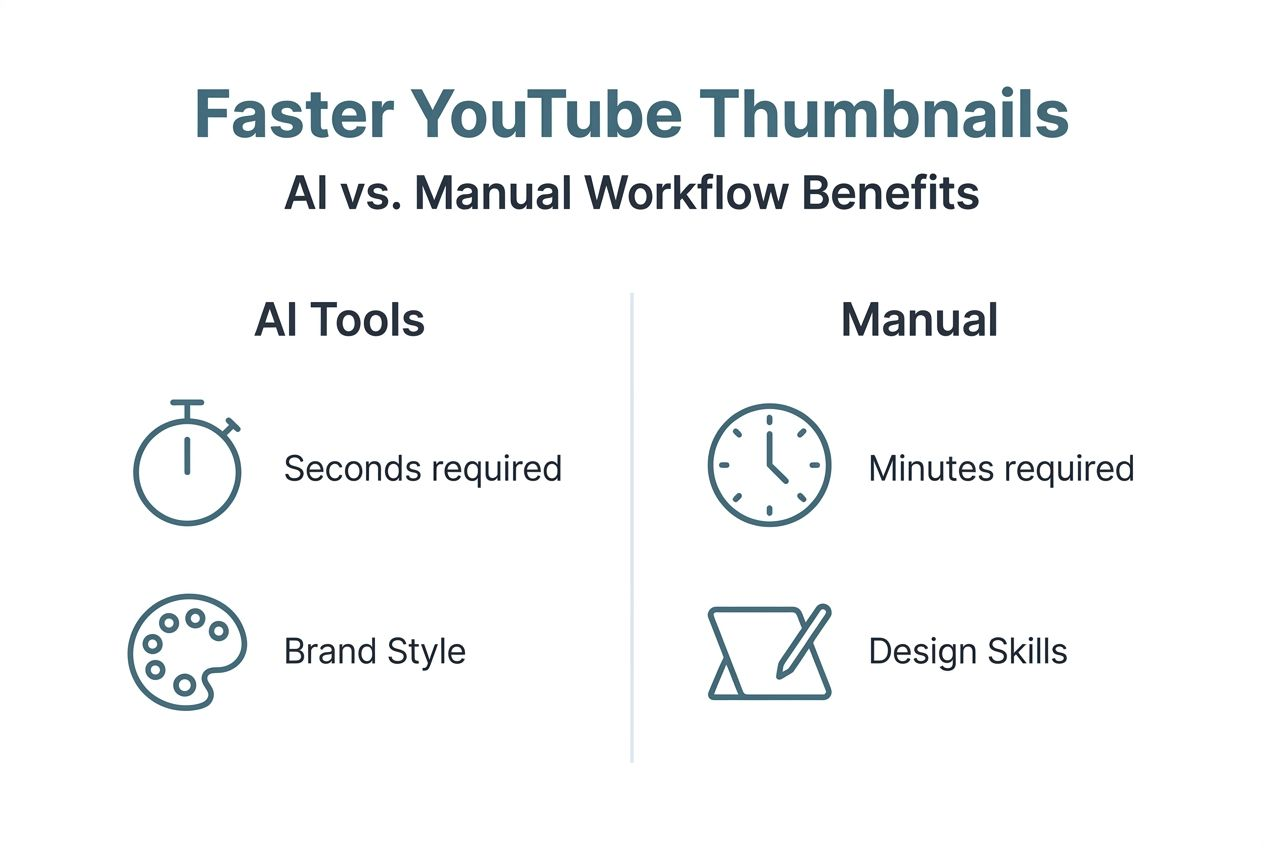
Workflow improvements extend beyond raw speed. AI tools enable rapid iteration, allowing you to test multiple design concepts in the time it would take to create a single manual thumbnail. Batch creation features let you generate thumbnails for an entire content series simultaneously, maintaining visual consistency while minimizing repetitive work.
The accessibility factor matters significantly for creators without formal design training. Traditional thumbnail creation requires understanding composition principles, color theory, typography, and image editing software. AI tools abstract these complexities behind intuitive interfaces, democratizing access to professional-quality designs.
| Factor | AI-Generated | Manual Creation |
|---|---|---|
| Time per thumbnail | 25-30 seconds | 5-10 minutes |
| Design skill required | None (interface-driven) | Intermediate to advanced |
| Creative control | High (review and customize) | Complete |
| Consistency across videos | Automatic brand alignment | Requires deliberate effort |
| Quality for beginners | Professional-grade | Variable, improves with practice |
Creators report spending 70-80% less time on thumbnail production after adopting AI tools. This recovered time typically gets redirected toward content research, scripting, filming, or audience engagement activities that directly impact channel growth.
Pro Tip: Dedicate saved time to analyzing your thumbnail performance data, identifying patterns in what works, and feeding those insights back into your AI tool settings for continuously improving results.
Limitations and tradeoffs of AI-generated thumbnails
AI thumbnail generators occasionally produce inaccurate or contextually inappropriate results in roughly 10-15% of cases. These errors range from minor issues like suboptimal text placement to more significant problems like misidentifying key video subjects or selecting unflattering frames.
Human review remains essential for maintaining quality standards and brand coherence. The most successful creators treat AI as a collaborative tool rather than a complete replacement for human judgment. This balanced approach captures efficiency gains while preserving the creative oversight that protects channel identity.
Common failure points to watch for:
- Blind trust in AI output without reviewing for context accuracy
- Ignoring established brand style guidelines in favor of AI suggestions
- Expecting AI thumbnails alone to guarantee viral success
- Overlooking subtle cultural or niche-specific elements the AI might miss
- Neglecting to test AI thumbnails against manual benchmarks periodically
The technology works best when you establish clear brand parameters, provide feedback on generated options, and maintain final approval over published thumbnails. Some creators find success using AI for 70-80% of thumbnails while manually creating designs for particularly important videos like channel trailers or flagship content.
Understanding AI thumbnail tool limitations helps you set realistic expectations and develop workflows that leverage strengths while mitigating weaknesses. The goal centers on finding the right balance between automation efficiency and human creative judgment for your specific channel needs.
Practical guide: using Thumb.nail Generator to boost video performance
Implementing AI thumbnail generation effectively requires understanding both the technical process and strategic considerations. Follow this step-by-step approach to maximize results:
- Upload your video or enter metadata into Thumb.nail Generator, providing the AI with source material to analyze for thumbnail creation.
- Let the AI generate multiple thumbnail options automatically, typically producing 5-10 variations optimized for different engagement patterns.
- Review generated options carefully, evaluating each for brand alignment, visual clarity, and contextual accuracy relative to your video content.
- Select and customize your preferred thumbnail, making manual adjustments to text, colors, or composition elements that need refinement.
- Apply the finalized thumbnail to YouTube through the platform's video editor, then monitor early engagement metrics to gauge performance.
- Analyze CTR and engagement data over the first 48 hours, comparing AI thumbnail performance against your channel benchmarks.
Optimization tips for better results:
- Provide the AI with clear video titles and descriptions to improve context understanding
- Test multiple AI-generated options through YouTube's A/B testing feature when available
- Save high-performing thumbnails as style references for future AI generations
- Combine AI efficiency with manual tweaks for critical branding elements
- Review YouTube thumbnail best practices to guide your selection criteria
Successful creators typically develop a hybrid workflow where AI handles initial generation and bulk of design work while human judgment provides final quality control and strategic direction. This approach captures maximum efficiency gains without sacrificing the creative standards your audience expects.
Comparing results across different AI thumbnail generators helps identify which tools best match your content style and workflow preferences.
Boost your YouTube thumbnails with AI-generated designs
Ready to transform your thumbnail creation process and boost your channel's click-through rates? Thumb.nail Generator offers a fast, user-friendly solution powered by Google Gemini AI that creates professional thumbnails in seconds. The platform requires zero design skills and generates multiple high-quality options for every video, letting you test what resonates with your audience.
Whether you're publishing daily content or weekly deep dives, AI thumbnail generation saves hours while improving engagement metrics that matter. Explore Thumb.nail Generator to see how AI can elevate your channel's visual appeal, or dive into detailed comparisons of top AI thumbnail tools to find the perfect fit for your workflow. Check out our complete thumbnail creation guide for additional strategies to maximize your YouTube success.
Frequently asked questions
What are AI-generated thumbnails?
AI-generated thumbnails are visual designs created by artificial intelligence algorithms that analyze your video content and automatically produce optimized thumbnail images. The technology uses machine learning trained on millions of high-performing thumbnails to select compelling images, apply effective text overlays, and arrange elements according to proven engagement patterns specific to YouTube.
How do AI thumbnail tools differ from manual design?
AI thumbnail generators automate the entire design process, from frame selection to color optimization, completing work in 30 seconds that would take 5-10 minutes manually. Manual design offers complete creative control but requires graphic design skills and software expertise. AI tools democratize access to professional-quality thumbnails while allowing customization and final approval by creators.
How much time do AI thumbnails save?
Creators typically save 5-10 minutes per thumbnail using AI generation instead of manual design, translating to 70-80% time reduction on thumbnail production overall. For channels publishing multiple videos weekly, this compounds to hours saved monthly that can redirect toward content creation, audience engagement, or strategic planning activities that directly grow your channel.
Can AI thumbnails maintain my brand consistency?
Yes, modern AI thumbnail tools support custom brand guidelines including color palettes, font choices, logo placement, and compositional styles. You input your brand parameters once, and the AI applies them consistently across all generated thumbnails while optimizing for engagement. Human review ensures the final output aligns with your specific brand identity and catches any contextual issues.
What are best practices for reviewing AI thumbnails?
Always verify that AI-generated thumbnails accurately represent your video content and avoid misleading imagery. Check text readability at small sizes, ensure faces are clearly visible and well-framed, and confirm color choices align with your brand palette. Test multiple AI options when possible and analyze performance data to identify which styles resonate best with your specific audience demographics.