

You spend hours perfecting your video content, but clicks remain frustratingly low. Many creators assume flashy colors and bold fonts alone drive engagement, yet the real anatomy of high-performing thumbnails combines strategic visual hierarchy, emotional resonance, and AI-driven optimization. This guide breaks down the essential elements that make thumbnails convert viewers into clicks, explores how artificial intelligence transforms thumbnail creation, and provides actionable steps to boost your video reach. Whether you rely on manual design or AI tools, understanding thumbnail anatomy empowers you to craft visuals that consistently outperform competitors and grow your channel.
Table of Contents
- Key takeaways
- The essential elements of high-performing thumbnails
- How AI is transforming thumbnail design and analysis
- Comparing manual design versus AI-generated thumbnails
- Practical steps to create high-performing thumbnails using AI tools
- Discover AI thumbnail tools that boost your video reach
- Frequently asked questions
Key Takeaways
| Point | Details |
|---|---|
| Visual hierarchy and emotion | High performing thumbnails use a clear focal point, bold text, and emotional imagery guided by visual hierarchy to maximize clicks. |
| Bold readable text | Limit text to five words and use thick high contrast fonts to convey value quickly. |
| Close up faces | Close up facial expressions deliver emotion clearly and outperform full body shots in thumbnails. |
| AI driven optimization | AI thumbnail tools predict engagement, generate multiple options, and accelerate testing to identify winners faster. |
The essential elements of high-performing thumbnails
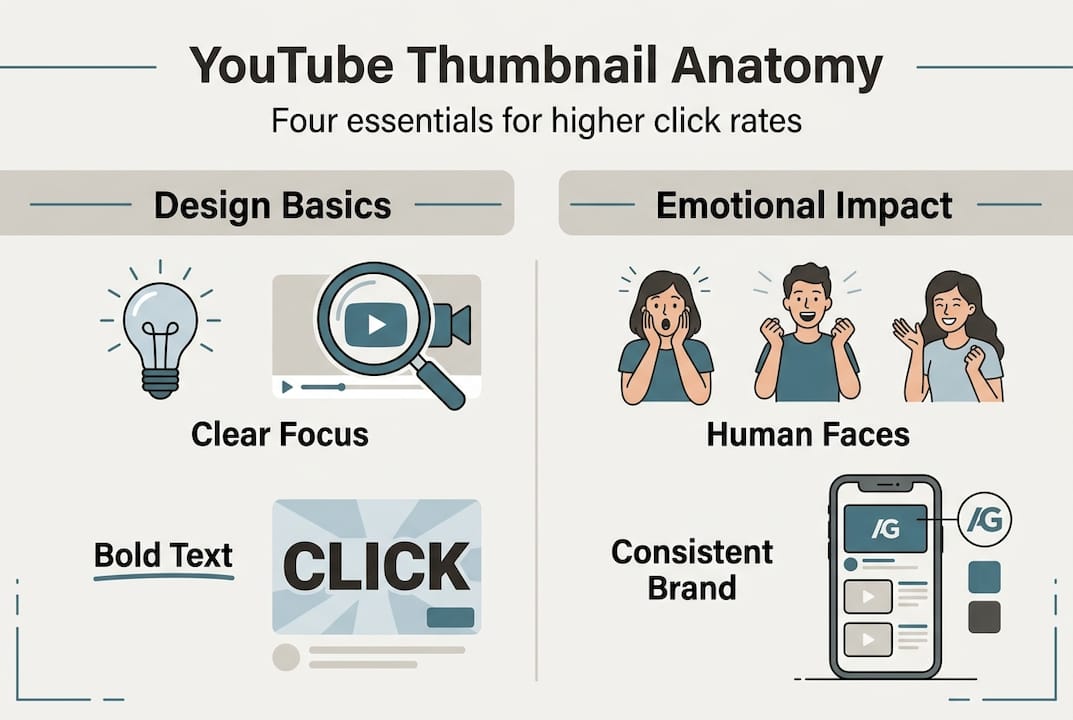
Effective thumbnails use clear focal points, bold text, and emotional cues to increase clicks. Each component serves a specific psychological purpose. Visual hierarchy determines what viewers notice first, guiding their eyes from the most important element to supporting details. Without deliberate hierarchy, thumbnails become visual noise that scrolls past unnoticed.
Bold, readable text acts as a value proposition shortcut. Viewers spend less than two seconds deciding whether to click, so your text must communicate benefit immediately. Choose fonts with thick strokes and high contrast against backgrounds. Limit text to five words maximum. Phrases like "3 Mistakes Costing You Money" or "Secret Strategy Revealed" trigger curiosity without overwhelming the visual space.
Emotional imagery drives engagement more powerfully than abstract concepts. Human faces expressing surprise, excitement, or concern create instant psychological connections. Viewers mirror emotions they see, making them more likely to click. Close-up facial expressions work better than full-body shots because they convey emotion clearly even in small thumbnail previews.

Consistent branding builds recognition across your video library. Use signature colors, fonts, or graphic elements in every thumbnail. When viewers recognize your style instantly, they associate quality with your brand and click more readily. This consistency compounds over time as your channel grows.
Pro Tip: Test thumbnail variations by uploading unlisted videos with different thumbnails, then promote each version to small audience segments. Track which design generates higher click-through rates before committing to your public upload.
Key elements that separate high-performing thumbnails from mediocre ones:
- Contrast ratios above 4.5:1 between text and background ensure readability on mobile devices
- Single focal point prevents viewer confusion and decision paralysis
- Complementary color schemes create visual harmony while maintaining energy
- Negative space around key elements prevents cluttered, overwhelming designs
- Action-oriented imagery showing movement or transformation hints at video content
Mastering these fundamentals provides the foundation for YouTube thumbnail tips that convert. Every element must work together cohesively rather than competing for attention.
How AI is transforming thumbnail design and analysis
AI thumbnail generators can predict engagement by analyzing visual and textual elements, streamlining creation for busy creators. Machine learning models trained on millions of successful thumbnails identify patterns humans might miss. These tools evaluate color contrast ratios, facial expression intensity, text placement effectiveness, and compositional balance simultaneously.
AI generates multiple thumbnail versions in seconds, allowing rapid iteration without design skills. You input basic parameters like video topic, target emotion, and brand colors, then receive dozens of professionally composed options. This speed advantage lets you test more variations and identify winners faster than manual design workflows allow.
Data-driven performance predictions separate modern AI tools from simple template generators. Advanced platforms analyze your channel's historical performance, audience demographics, and niche-specific engagement patterns. They predict which thumbnail elements will resonate most with your specific viewers, not just generic best practices. This personalization increases relevance and click-through rates.
AI helps marketers avoid common design pitfalls through real-time feedback. If your text is too small, colors clash, or focal points compete, the system flags issues before you publish. This quality control prevents rookie mistakes that tank video performance.
Pro Tip: Use AI tools to generate baseline thumbnails, then add unique personal touches manually. This hybrid approach combines AI efficiency with creative differentiation that makes your content stand out.
The best AI thumbnail generator platforms offer these capabilities:
- Emotion detection algorithms that assess facial expressions and suggest improvements
- A/B testing frameworks built directly into the platform
- Performance benchmarking against top videos in your niche
- Brand consistency enforcement that maintains visual identity across thumbnails
- Mobile preview simulations showing exactly how thumbnails appear on different devices
These features democratize professional design quality for creators without graphic design backgrounds. You can create YouTube thumbnails with AI that rival those from dedicated design teams, leveling the playing field for independent creators.
Comparing manual design versus AI-generated thumbnails
AI tools offer speed and data insights; manual design allows for creative control and experimentation. Each approach brings distinct advantages depending on your resources, skills, and goals. Understanding when to use each method maximizes efficiency and results.
| Aspect | Manual Design | AI-Generated |
|---|---|---|
| Creation speed | 30-90 minutes per thumbnail | 2-5 minutes per thumbnail |
| Design skills required | Intermediate to advanced Photoshop/Canva proficiency | None, just basic input parameters |
| Creative uniqueness | Unlimited, fully customizable | Template-based with customization options |
| Data-driven optimization | Requires separate analytics and iteration | Built-in performance predictions |
| Cost | Software subscriptions plus designer time | Tool subscription only |
| Learning curve | Steep, requires design education | Minimal, intuitive interfaces |
Manual design excels when brand differentiation matters most. If your channel's identity depends on distinctive artistic style, hand-crafted thumbnails communicate authenticity. You control every pixel, ensuring perfect alignment with your creative vision. This approach works well for established creators with recognizable aesthetics or those targeting design-savvy audiences who appreciate craftsmanship.
AI strengths center on efficiency and optimization. New creators building content libraries benefit enormously from rapid thumbnail generation. Testing multiple variations becomes practical when creation time drops from hours to minutes. The data insights help you learn what works faster, accelerating your growth curve.
Hybrid approaches often deliver the best results. Use AI to generate foundational layouts and test concepts quickly, then refine winning designs manually to add unique flair. This workflow combines speed with creative control, letting you produce more thumbnails without sacrificing quality.
Efficiency gains directly impact video ROI. If you publish three videos weekly, saving 60 minutes per thumbnail through AI tools reclaims nine hours monthly. That time can go toward content creation, audience engagement, or strategic planning. The compounding effect over months dramatically increases channel growth potential.
Consider your specific context when choosing methods:
- High-volume creators benefit most from AI speed and consistency
- Niche channels with unique aesthetics may prefer manual control
- Growing channels should test both approaches to identify what resonates
- Teams can assign AI generation to assistants while reserving manual refinement for creative leads
The AI vs manual thumbnail design debate misses the point. Smart creators use both strategically, applying the right tool for each situation rather than committing to one approach exclusively.
Practical steps to create high-performing thumbnails using AI tools
Following structured AI-assisted workflows improves thumbnail effectiveness and saves time. This systematic approach ensures you leverage AI capabilities fully while maintaining quality control and brand consistency.
-
Choose an AI thumbnail generator that matches your needs. Evaluate platforms based on customization depth, brand consistency features, and integration with your existing workflow. Free tools work for experimentation, but paid platforms offer advanced analytics and higher-quality outputs. Look for generators that support your video niche, whether that's gaming, education, or lifestyle content.
-
Upload video concepts, screenshots, or reference images. Most AI tools work best with visual input that captures your video's core message. Provide clear, high-resolution images showing key moments or subjects. The AI analyzes these inputs to generate contextually relevant thumbnails rather than generic templates.
-
Customize text overlays and branding elements. Input your headline, adjust font choices, and position text for maximum impact. Apply your brand colors, logos, and signature design elements. This customization transforms generic AI outputs into thumbnails that authentically represent your channel identity.
-
Analyze AI performance predictions and optimization suggestions. Review the platform's data-driven recommendations for improving click-through potential. Pay attention to contrast warnings, readability scores, and emotional impact assessments. These insights help you understand why certain designs outperform others.
-
Test thumbnails through A/B campaigns before committing. Use YouTube's thumbnail testing features or third-party analytics to compare variations with real audience data. Track click-through rates, watch time, and engagement metrics for each version. Let performance data guide your final selection rather than personal preference.
Pro Tip: Create a thumbnail template library within your AI tool that captures your brand standards. This library ensures consistency while allowing quick customization for each new video, balancing efficiency with quality.
Additional workflow optimizations:
- Batch create thumbnails for multiple videos in single sessions to maintain visual consistency
- Schedule regular thumbnail audits to identify underperforming videos that need redesigns
- Document which AI-generated elements work best for your audience to inform future designs
- Export multiple size variations optimized for different platforms beyond YouTube
The AI thumbnail creation steps become second nature with practice. What initially takes 30 minutes shrinks to five as you learn your tool's capabilities and develop efficient workflows. This time savings compounds across hundreds of videos, freeing you to focus on content quality and audience building.
Successful creators treat thumbnail creation as seriously as video production. Investing time to master AI tools pays dividends through higher click-through rates, better audience retention, and accelerated channel growth. The anatomy of high-performing thumbnails becomes intuitive as you apply these steps consistently.
Discover AI thumbnail tools that boost your video reach
Ready to transform your thumbnail creation process? Our comprehensive best AI thumbnail generator comparison breaks down top platforms, pricing, and features to match your specific needs. Whether you're launching your first channel or scaling an established brand, you'll find tools that accelerate growth.
Explore our detailed YouTube thumbnail tips guide for advanced strategies that complement AI tools with proven psychological principles. Learn exactly how top creators structure their thumbnails for maximum impact. Our step-by-step AI thumbnail guide walks you through the complete workflow, from concept to published video, ensuring you leverage every feature effectively. Start creating thumbnails that consistently outperform competitors and drive measurable channel growth.
Frequently asked questions
What makes a thumbnail high-performing?
High-performing thumbnails combine clear visual hierarchy, readable text, emotional imagery, and consistent branding elements. They communicate video value within two seconds, triggering curiosity or emotional response that compels clicks. Effective thumbnails use high-contrast colors, close-up facial expressions, and concise text overlays limited to five words maximum. The best designs guide viewer attention to a single focal point rather than overwhelming with competing elements.
How does AI improve thumbnail design?
AI analyzes millions of successful thumbnails to identify patterns in color schemes, text placement, facial expressions, and compositional balance. It generates multiple design variations instantly, predicting which combinations will achieve highest click-through rates for your specific audience. Machine learning models provide real-time feedback on readability, contrast ratios, and emotional impact. This data-driven approach eliminates guesswork and accelerates the learning curve for creators without design backgrounds.
Can I create effective thumbnails without AI tools?
Manual design allows complete creative control and produces unique thumbnails that differentiate your brand. However, this approach requires intermediate to advanced graphic design skills and significantly more time per thumbnail. Without AI's data insights, you rely on intuition and slower trial-and-error testing to identify what works. Many successful creators use hybrid workflows, generating baseline designs with AI then adding manual refinements for distinctive style.
What are common mistakes in thumbnail design?
Overcrowded thumbnails with multiple competing focal points confuse viewers and reduce clicks. Unreadable text due to poor contrast, small font sizes, or decorative typefaces fails to communicate value quickly. Lack of emotional cues through facial expressions or dynamic imagery results in bland, forgettable designs. Inconsistent branding across your video library prevents recognition and weakens channel identity. Ignoring mobile preview appearance leads to thumbnails that look great on desktop but fail on smartphones where most viewing occurs.