

You pour hours into scripting, filming, and editing your videos, only to watch them languish with double-digit view counts. The culprit? Your thumbnail isn't doing its job. While YouTube's algorithm considers dozens of factors, your thumbnail remains the single most influential element in whether someone clicks on your video or scrolls past it. This guide walks you through creating thumbnails that capture attention and drive clicks, even if you've never touched design software. You'll learn the essential principles, avoid common pitfalls, and discover how modern tools make professional results accessible to everyone.
Table of Contents
- Key takeaways
- Why thumbnails matter for your YouTube channel
- What you need before creating your first thumbnail
- Step-by-step process to design an eye-catching thumbnail
- Common mistakes and troubleshooting tips
- Enhance your thumbnails with AI-powered tools
- FAQ
Key Takeaways
| Point | Details |
|---|---|
| Thumbnails boost clicks | Your thumbnail is the single most influential factor in whether a viewer clicks your video. |
| Consistency strengthens brand | A recognizable visual style helps viewers trust your content and click more often. |
| Avoid common thumbnail mistakes | Avoid low resolution images, excessive text, and visuals that don’t clearly represent the video content. |
| Easy tools and AI | Beginner friendly options like Canva, GIMP, and AI thumbnail generators speed up creation and improve quality. |
| Study top creators don’t copy | Study top creators to identify patterns in color, text placement, and imagery, then adapt those principles to your own style. |
Why thumbnails matter for your YouTube channel
Your thumbnail functions as a billboard in a highway of content. When viewers scroll through their feed or search results, they make split-second decisions about which videos deserve their time. A compelling thumbnail stops that scroll and transforms a passive browser into an active viewer.
The numbers tell a clear story. Channels that optimize their thumbnails see measurable improvements in click-through rates, which directly influences how YouTube's algorithm promotes their content. Higher engagement signals to the platform that your video deserves broader distribution, creating a virtuous cycle of visibility and growth. Your thumbnail communicates your video's value proposition faster than any title or description ever could.
Consistency matters as much as individual thumbnail quality. When viewers recognize your visual style, they're more likely to click because they've already built trust with your content. This brand recognition becomes one of your most valuable assets as your channel grows.
Pro Tip: Study thumbnails from top creators in your niche, but don't copy them. Identify patterns in color schemes, text placement, and image choices, then adapt those principles to match your unique style and content.
Most beginners make the same critical errors:
- Using low-resolution screenshots that look pixelated
- Cramming too much text into a small space
- Choosing images that don't clearly represent the video content
- Ignoring how thumbnails appear on mobile devices
"The thumbnail is your video's first impression. Make it count by ensuring it's visually striking, relevant, and honest about what viewers will get."
Think of your thumbnail as a promise to your audience. When you deliver on that promise consistently, viewers return. When you mislead them with clickbait, they leave disappointed and never come back. Following proven YouTube thumbnail tips helps you strike the right balance between eye-catching and authentic.
What you need before creating your first thumbnail
Starting your thumbnail creation journey doesn't require expensive equipment or years of design training. The barrier to entry has never been lower, thanks to accessible tools and platforms designed specifically for content creators.
Your basic toolkit includes:
- A computer or tablet with internet access
- Graphics software (free options like Canva or paid tools like Photoshop)
- Source images (screenshots from your video, stock photos, or custom graphics)
- Understanding of YouTube's technical requirements
| Requirement | Specification | Why it matters |
|---|---|---|
| Dimensions | 1280x720 pixels | Ensures clarity across all devices |
| Aspect ratio | 16:9 | Matches YouTube's player format |
| File size | Under 2MB | Faster upload and processing |
| Format | JPG, PNG, or GIF | Platform compatibility |
The software landscape offers something for every skill level and budget. Canva provides drag-and-drop simplicity with pre-made templates. Photoshop delivers professional-grade control for those willing to climb the learning curve. GIMP offers powerful features without the price tag.
AI thumbnail generators can dramatically speed up thumbnail creation and improve quality for beginners. These tools analyze your video content and suggest layouts, color schemes, and text placement based on proven patterns. Instead of starting from a blank canvas, you begin with a professionally structured foundation.
Pro Tip: Create a swipe file of thumbnails you admire. Screenshot them, organize them by category, and reference this collection when you need inspiration. This practice trains your eye to recognize what works.
Gather your image assets before you start designing. Pull high-quality screenshots from your video at moments of peak emotion or action. If you're using photos of yourself, shoot them with good lighting and clear expressions. Stock photo sites provide backup options when your own footage falls short.
Understanding file specifications prevents technical headaches. YouTube accepts JPG, PNG, and GIF formats, but JPG typically offers the best balance of quality and file size. Keep your final file under 2MB to ensure quick uploads and processing. The platform displays thumbnails at various sizes, so your design must remain legible even when shrunk to mobile dimensions.
Comparing different AI thumbnail generator options helps you find the right fit for your workflow and budget. Some tools excel at speed, others at customization. Your choice depends on whether you prioritize rapid output or fine-tuned control.
Step-by-step process to design an eye-catching thumbnail
Creating an effective thumbnail follows a repeatable process that gets easier with practice. Each step builds on the previous one, transforming a rough concept into a polished visual that compels clicks.
- Define your thumbnail's core message in five words or less
- Select a high-impact image that conveys emotion or curiosity
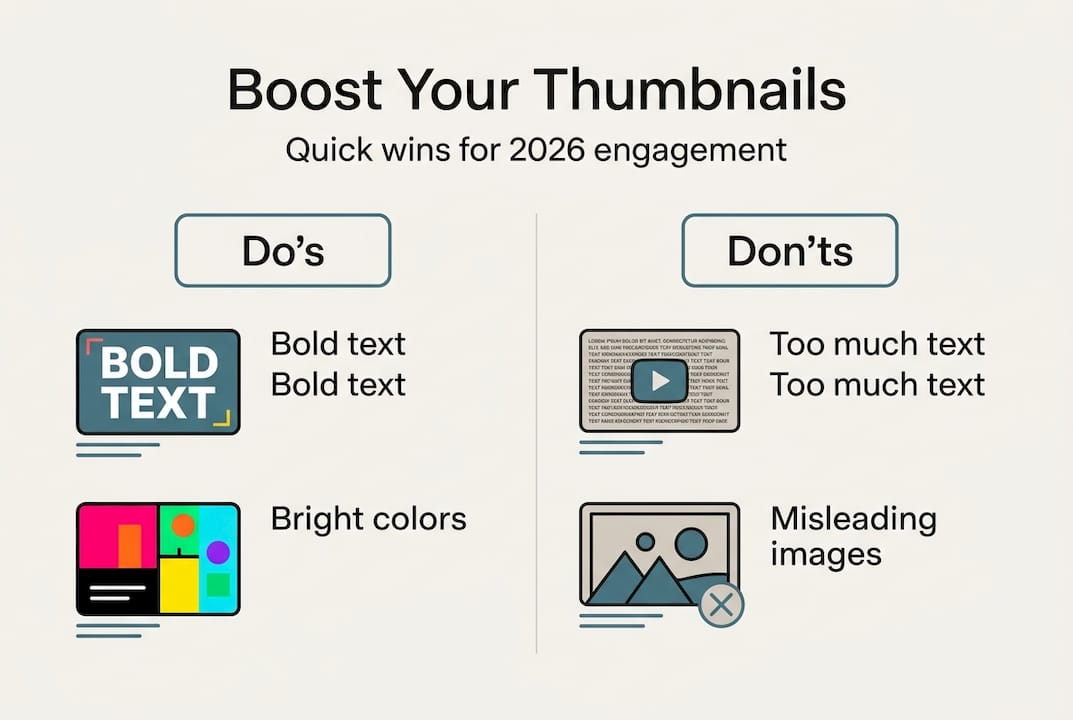
- Choose two or three contrasting colors that pop against YouTube's interface
- Add minimal text using large, bold fonts
- Test visibility by viewing your thumbnail at actual size
- Refine based on how it looks next to competitor thumbnails
Your concept should connect directly to your video's hook. If your video promises to reveal three secrets, your thumbnail should visually tease that revelation. If you're reviewing a product, show the product with an expression that signals your verdict.
Following a structured design process helps content creators consistently produce effective thumbnails. This systematic approach removes guesswork and builds confidence through repetition.
Color psychology plays a bigger role than most beginners realize. Bright, saturated colors grab attention in crowded feeds. Red signals urgency or excitement. Blue conveys trust and calm. Yellow radiates energy and optimism. Choose colors that align with your content's emotional tone while ensuring they contrast sharply with each other and with YouTube's white or dark backgrounds.

Pro Tip: Use the rule of thirds when positioning elements. Divide your thumbnail into a 3x3 grid and place key elements at the intersection points. This creates natural visual balance that feels professional.
Text should enhance, not dominate. Limit yourself to three to five words maximum. Make every word count by choosing terms that spark curiosity or promise value. Use fonts that remain readable even at thumbnail size. Avoid script or decorative typefaces that look elegant at full size but become illegible when shrunk.
| Element | Best practice | Common mistake |
|---|---|---|
| Text | 3-5 words, bold sans-serif font | Full sentences, decorative fonts |
| Images | Close-up faces or clear product shots | Busy scenes with multiple focal points |
| Colors | High contrast, 2-3 main colors | Too many colors, low contrast |
| Layout | Clear hierarchy, rule of thirds | Centered everything, no focal point |
Faces with expressive emotions consistently outperform generic graphics. Your face (or your subject's face) creates human connection and signals authenticity. Aim for genuine reactions captured mid-expression rather than posed smiles. Surprise, excitement, confusion, and determination all work well depending on your content.
AI tools accelerate this entire process by suggesting layouts based on your content type. They analyze thousands of high-performing thumbnails to recommend compositions, color combinations, and text placement. You maintain creative control while benefiting from data-driven insights. Learning how to create YouTube thumbnails with AI cuts your design time from hours to minutes.
Always preview your thumbnail at actual size before publishing. What looks perfect at full screen might become an indecipherable mess at 320 pixels wide. Check how it appears on both light and dark YouTube themes. View it alongside thumbnails from similar videos to ensure yours stands out.
Common mistakes and troubleshooting tips
Even experienced creators fall into thumbnail traps that tank their click-through rates. Recognizing these pitfalls helps you avoid them from the start and diagnose problems when your videos underperform.
The most frequent error is information overload. Beginners try to cram every detail about their video into the thumbnail, resulting in visual chaos. Viewers scrolling quickly can't process complex images or lengthy text. Simplicity wins every time. One clear focal point beats three competing elements.
Misleading thumbnails generate short-term clicks but long-term damage. If your thumbnail promises something your video doesn't deliver, viewers click away within seconds. YouTube's algorithm notices this poor retention and stops promoting your content. Worse, you erode trust with your audience, making them less likely to click future videos.
Avoiding clutter and ensuring image clarity are essential for thumbnails to perform well. This principle applies to every design choice you make, from color selection to text placement.
Common pitfalls include:
- Using screenshots with poor lighting or blurry focus
- Selecting fonts that are too thin or stylized to read at small sizes
- Ignoring how thumbnails display on mobile devices (where most viewing happens)
- Creating thumbnails that blend into YouTube's interface instead of contrasting with it
- Failing to maintain consistent branding across your channel
Low contrast kills visibility. If your text color is too similar to your background, viewers literally cannot read your message. Use online contrast checkers to ensure your color combinations meet accessibility standards. White text with a dark outline works in almost any situation.
Pro Tip: Create multiple thumbnail versions for important videos and test them using YouTube's A/B testing features. Let real data tell you which design performs best rather than relying on your gut.
"The best thumbnail is the one that accurately represents your content while standing out from the competition. Honesty and clarity always outperform trickery in the long run."
Technical issues can sabotage even well-designed thumbnails. Uploading files that exceed 2MB causes YouTube to compress them, potentially degrading quality. Using the wrong aspect ratio results in awkward cropping. Forgetting to save your work in the correct format wastes time when you need to make quick edits.
Regularly audit your thumbnail performance through YouTube Analytics. Compare click-through rates across videos to identify which design choices resonate with your audience. Don't be afraid to update thumbnails on older videos if you discover better approaches. Some creators see significant view boosts simply by refreshing thumbnails on catalog content.
When troubleshooting poor performance, consider whether your thumbnail:
- Clearly communicates the video's value proposition
- Uses colors and composition that stand out in feeds
- Remains legible and attractive at mobile sizes
- Aligns with your channel's overall brand identity
- Accurately represents the content without misleading viewers
Understanding YouTube thumbnail mistakes to avoid saves you from learning these lessons through painful trial and error.
Enhance your thumbnails with AI-powered tools
You've learned the principles, avoided the pitfalls, and understand what makes thumbnails work. Now it's time to put that knowledge into action with tools designed to make the process effortless. Traditional design software requires hours of learning and practice. AI-powered solutions deliver professional results in seconds, even if you've never created a graphic in your life.
Our AI thumbnail generator analyzes your video content and suggests optimized designs based on proven patterns from millions of high-performing thumbnails. You maintain full creative control while benefiting from data-driven recommendations. Generate multiple variations instantly, compare them side by side, and choose the one that best represents your content.
Whether you're just starting out or managing an established channel, the right tools multiply your efficiency. Compare AI thumbnail tool options to find the perfect fit for your workflow and budget. Free tiers let you experiment without commitment, while premium features unlock advanced customization for creators who demand pixel-perfect control.
Combine AI efficiency with expert YouTube thumbnail tips to maximize your views and engagement. The platform handles the technical complexity while you focus on what matters most: creating content your audience loves.
FAQ
How do I choose the best thumbnail size for YouTube?
YouTube requires thumbnails at 1280x720 pixels with a 16:9 aspect ratio to ensure clarity across all devices, from desktop monitors to mobile phones. This dimension matches the platform's video player format and prevents awkward cropping or stretching. Save your files as JPG, PNG, or GIF under 2MB for optimal upload performance and processing speed.
Can I use AI to create thumbnails if I have no design experience?
Absolutely. AI thumbnail generators enable beginners to create professional thumbnails quickly without design skills. These tools provide templates, suggest layouts, and automate technical details like sizing and formatting. You simply upload your content or describe your video, and the AI generates multiple options within seconds. No prior knowledge of design principles or software required.
What common mistakes should I avoid when designing thumbnails?
Overcrowding thumbnails and using misleading images hurt viewership and credibility. Keep text minimal (three to five words maximum), avoid cluttered backgrounds, and ensure your thumbnail honestly represents your video content. Test how your design looks at actual thumbnail size on mobile devices before publishing. Low contrast between text and background makes your message unreadable, while tiny fonts become illegible at small sizes.
How often should I update my thumbnail strategy?
Review your thumbnail performance monthly through YouTube Analytics, paying attention to click-through rates and how they compare across videos. If certain design elements consistently outperform others, incorporate those patterns into future thumbnails. Don't hesitate to refresh thumbnails on older videos if you discover better approaches. Many creators see significant view increases by updating catalog content with improved designs.
Do I need to match my thumbnail style across all videos?
Consistent branding helps viewers recognize your content instantly, building trust and increasing the likelihood they'll click on new videos. Develop a signature style using consistent colors, fonts, and layout approaches while allowing flexibility for different content types. Your thumbnails should feel like a cohesive family without being identical clones. This balance maintains visual interest while reinforcing your channel identity.