

Creating thumbnails that grab attention can feel overwhelming when you lack graphic design skills and time. YouTube creators often lose potential viewers simply because their thumbnails fail to stand out in crowded feeds. This guide reveals how AI-powered tools can transform your thumbnail creation process, helping you generate professional, click-worthy designs in seconds while dramatically improving your video performance and channel growth.
Table of Contents
- Introduction To Thumbnail Importance For YouTube
- Prerequisites: Tools, Knowledge, And Setup
- Key Visual Elements For Effective Thumbnails
- Using AI Tools For Fast, Non-Technical Thumbnail Creation
- Step-By-Step AI Thumbnail Creation Process
- Common Mistakes And Troubleshooting
- Measuring Success And Expected Outcomes
- Boost Your YouTube Channel With AI Thumbnail Tools
Key takeaways
| Point | Details |
|---|---|
| AI saves massive time | AI tools reduce creation time by 95% compared to manual design methods. |
| Visual elements matter | Human faces and bold colors significantly increase click-through rates on mobile devices. |
| Avoid clickbait traps | Misleading thumbnails damage subscriber trust and reduce retention by 14%. |
| No skills required | Step-by-step AI solutions make professional thumbnails accessible without design experience. |
| Track performance | Monitor CTR metrics to continuously optimize thumbnail effectiveness over time. |
Introduction to thumbnail importance for YouTube
Your thumbnail serves as the first impression viewers get before deciding whether to click your video. Research shows that thumbnails influence up to 90% of CTR on YouTube, making them more critical than titles in many cases. Mobile viewers now dominate YouTube traffic, consuming content on smaller screens where visual clarity matters even more. Simple designs with clear hierarchy help your content stand out in endless scrolling feeds.
Human faces naturally draw attention because viewers connect emotionally with expressions. Bold colors create contrast against YouTube's white or dark interface, making your thumbnail pop among competitors. Strategic placement of these elements can mean the difference between a video that takes off and one that languishes with minimal views.
Poor thumbnails sabotage your reach before viewers even consider your content quality. You might create amazing videos, but weak visual presentation prevents the algorithm from recognizing engagement potential. Understanding thumbnail psychology helps you design strategically rather than guessing what might work.
Key factors that maximize thumbnail performance include:
- Clear focal points that communicate video value instantly
- Readable text overlays optimized for mobile viewing
- Emotional expressions that create curiosity or connection
- Color schemes that contrast with surrounding thumbnails
- Consistent branding elements for channel recognition
Prerequisites: tools, knowledge, and setup
Before diving into AI thumbnail creation, gather the essential tools and knowledge that streamline your workflow. Access to AI thumbnail generators like Thumb.nail Generator powered by Google Gemini AI forms your foundation. These platforms eliminate technical barriers while delivering professional results. Basic familiarity with YouTube's interface helps you navigate analytics and upload processes efficiently.
Understanding CTR metrics allows you to measure thumbnail effectiveness objectively. You need video metadata ready, including titles, topics, and target audience details that help AI generate contextually relevant designs. Testing multiple thumbnails requires some knowledge of A/B testing principles and how to interpret performance data. Setting up accounts and software in advance prevents workflow interruptions when you're ready to create.
Follow this step-by-step AI thumbnail guide to prepare your workspace properly. The table below outlines essential preparation elements:
| Component | Purpose | Time Investment |
|---|---|---|
| AI platform account | Access generation tools | 5 minutes |
| Video metadata | Inform AI context | 10 minutes per video |
| Analytics access | Track performance | One-time setup |
| Testing framework | Compare variants | 15 minutes initial |
| Device preview tools | Check mobile display | 5 minutes per thumbnail |
Collecting sample thumbnails from successful creators in your niche provides inspiration without copying. Study what works in your specific category because gaming thumbnails differ dramatically from cooking or finance content. Prepare multiple video details at once to batch-create thumbnails efficiently.
Key visual elements for effective thumbnails
Mastering core design principles transforms average thumbnails into viewer magnets. Human faces showing clear, expressive emotions create immediate connection because viewers instinctively respond to emotional cues. Close-up facial shots work better than full-body images, especially on mobile screens where detail matters. Bold and contrasting colors make your thumbnail stand out in crowded feeds where hundreds of options compete for attention.

Text overlays improve clarity by reinforcing your video's value proposition, but readability on mobile screens remains non-negotiable. Limit text to 3-5 words maximum, using large, bold fonts with high contrast backgrounds. Cluttered layouts confuse viewers and reduce click-through rates, so embrace negative space that guides the eye naturally. Maintain brand consistency through recurring color schemes, fonts, or logo placement that helps subscribers recognize your content instantly.
Check out these YouTube thumbnail tips for deeper insights into visual strategy. The most effective elements include:
- Expressive faces positioned prominently in the frame
- Color combinations that create strong visual contrast
- Large, readable text that communicates value quickly
- Simple compositions with one clear focal point
- Consistent branding elements across all thumbnails
- Emotional triggers that spark curiosity or excitement
Pro Tip: Test thumbnail visibility on various devices before finalizing by viewing it at actual size on your phone, tablet, and desktop to ensure critical elements remain clear across all screen sizes.
Lighting and image quality also impact perceived professionalism. Bright, well-lit images appear more inviting than dark or muddy photos. Sharp focus on key elements draws attention while blurred backgrounds create depth without distraction.
Using AI tools for fast, non-technical thumbnail creation
AI-powered platforms revolutionize thumbnail creation by automating design decisions that previously required years of graphic design experience. These tools analyze your video content and trending design elements automatically, generating thumbnails optimized for current viewer preferences. Google Gemini-enabled platforms like Thumb.nail Generator process your inputs and produce multiple professional variants in seconds.
The technology eliminates the need for complex software like Photoshop or hours spent learning design principles. AI tools reduce creation time by over 95% compared to manual methods, freeing you to focus on content creation instead of design work. Multiple thumbnail variants emerge from a single request, enabling quick A/B testing and iteration without additional time investment.
Explore best AI thumbnail generators to compare features and capabilities. Key advantages include:
- Automatic analysis of video content for contextual relevance
- Generation of multiple design variants for testing
- Zero graphic design skills required for professional results
- Dramatic time savings compared to manual creation
- Easy integration with YouTube upload workflows
- Continuous learning from performance data
AI-powered thumbnail generation cuts creation time dramatically while improving CTR by leveraging data-driven design principles that human designers might miss through intuition alone.
AI platforms continuously improve by learning from millions of successful thumbnails across YouTube. They identify patterns in color psychology, composition, and text placement that correlate with higher engagement. This data-driven approach often outperforms manual design based on subjective preferences.
Step-by-step AI thumbnail creation process
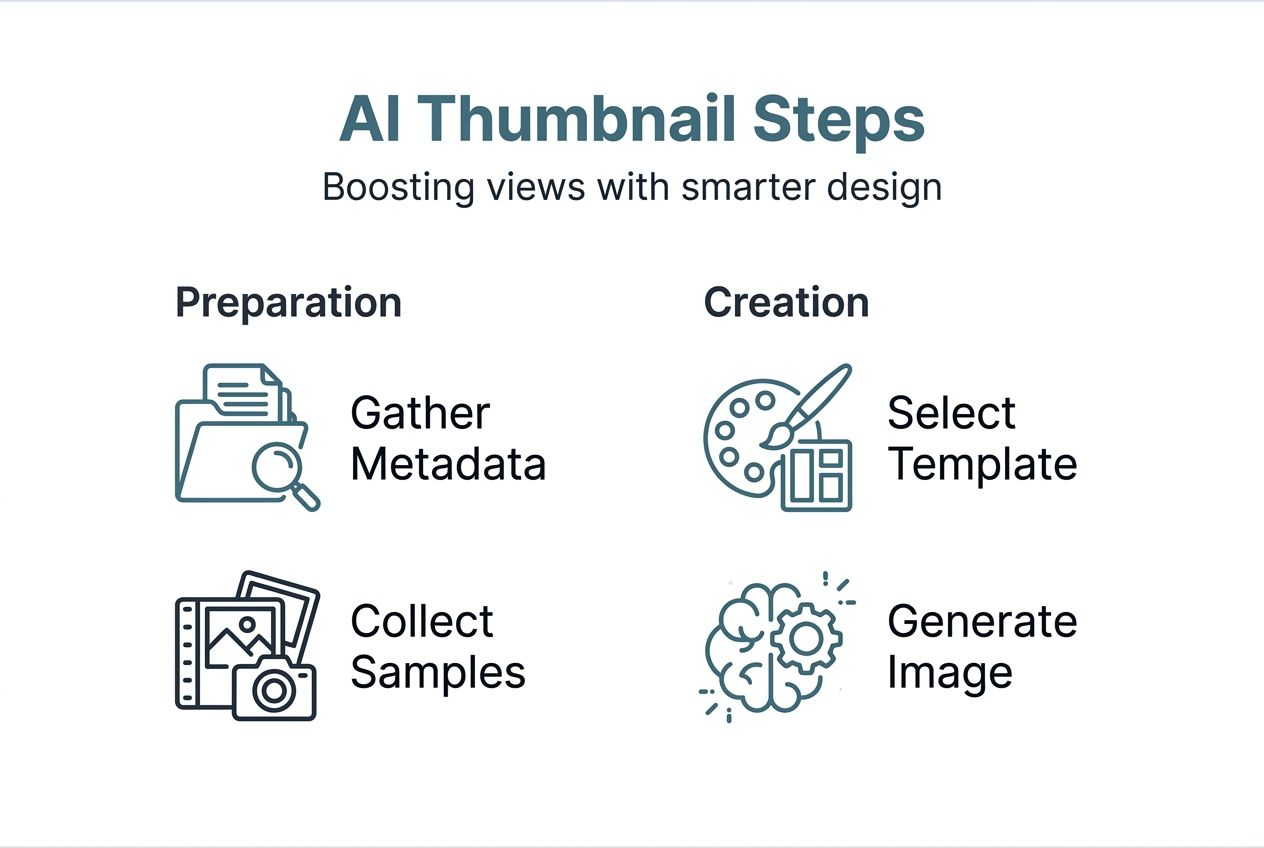
Implementing an AI thumbnail strategy becomes straightforward when you follow a systematic process. Start by accessing your chosen AI thumbnail generator platform like Thumb.nail Generator through a simple account creation. Input your video URL or key metadata including title, topic, and target audience to provide context for relevant designs. The AI uses this information to generate thumbnails that align with your content and viewer expectations.
Select style preferences from available templates or let the AI recommend options based on your niche. Generate multiple thumbnails with varied compositions, colors, and text treatments to maximize testing opportunities. Preview each option carefully, comparing them side by side while considering mobile visibility. Choose the highest-performing thumbnail based on AI predictions or your intuition, then download and upload directly to YouTube.
Follow this AI thumbnail creation guide for detailed instructions. The complete workflow includes:
- Access the AI thumbnail generator platform and create an account
- Input video URL or enter key metadata for contextual relevance
- Select style preferences or allow AI to recommend optimal designs
- Generate multiple thumbnail variants for comparison and testing
- Preview options on different device sizes to ensure mobile readability
- Choose the highest-performing thumbnail based on visual appeal
- Download your selected design in YouTube-optimized format
- Upload to YouTube and monitor performance metrics
Pro Tip: Regularly refresh thumbnails based on performance analytics to maximize CTR by replacing underperforming designs with new AI-generated variants after collecting sufficient data.
Batch-creating thumbnails for multiple videos saves even more time. Prepare metadata for several videos at once, then generate designs in sequence without switching contexts. This approach maintains creative consistency while capitalizing on your focused attention.
Common mistakes and troubleshooting
Even with AI assistance, creators make predictable mistakes that undermine thumbnail effectiveness. Cluttered designs with too many elements confuse viewers rather than attracting them. Your thumbnail should communicate one clear message, not multiple competing ideas. Overusing clickbait imagery creates short-term gains but decreases subscriber retention by 14% over six months as trust erodes.
Text and visuals must remain readable on small mobile screens where most YouTube viewing happens. Tiny fonts or low contrast between text and background render your message invisible. Neglecting to review thumbnail performance metrics leaves you guessing instead of optimizing based on data. Regular analysis reveals which design elements resonate with your specific audience.
Learn from these thumbnail mistakes and fixes to avoid common pitfalls. Address these frequent issues:
- Simplify cluttered designs by removing non-essential elements
- Replace clickbait with honest imagery that accurately represents content
- Increase text size and contrast for mobile readability
- Test thumbnails on actual mobile devices before publishing
- Monitor CTR weekly to identify underperforming designs quickly
- Avoid generic stock photos that fail to differentiate your content
When thumbnails underperform despite following best practices, consider audience-specific preferences. Gaming audiences respond to different visual triggers than business or lifestyle viewers. Test dramatically different approaches rather than minor variations when initial designs fail. Sometimes the AI needs more specific instructions about your unique brand voice or audience expectations.
Measuring success and expected outcomes
Tracking the right metrics reveals whether your AI thumbnail strategy delivers meaningful results. Click-through rate improvements typically range between 15% and 35% when creators transition from amateur designs to AI-optimized thumbnails. Monitor channel growth rates influenced by thumbnail optimization, as better CTR signals the algorithm to promote your content more aggressively. Watch subscriber retention to ensure thumbnails don't alienate viewers through misleading imagery.
A/B testing data refines thumbnail choices over time by revealing which design elements your specific audience prefers. YouTube Studio provides built-in thumbnail testing for videos with significant traffic. Maintain steady gains through continuous optimization rather than expecting one-time fixes. The most successful creators treat thumbnail creation as an ongoing process that evolves with audience preferences and platform changes.
| Metric | Baseline | Expected Improvement | Timeline |
|---|---|---|---|
| Click-through rate | 2-4% average | 15-35% increase | 2-4 weeks |
| View duration | Varies by niche | 10-20% improvement | 4-8 weeks |
| Subscriber growth | Current rate | 20-40% acceleration | 8-12 weeks |
| Engagement rate | Channel average | 15-25% increase | 4-6 weeks |
Document which thumbnail elements correlate with your best-performing videos. Patterns emerge over time showing whether your audience responds more to faces, text, colors, or specific compositions. This data informs future AI inputs, creating a virtuous cycle of improvement. Compare performance across video topics to identify whether certain subjects require different thumbnail approaches.
Boost your YouTube channel with AI thumbnail tools
Ready to transform your thumbnail creation process and boost your channel's performance? The Thumb.nail Generator offers fast, AI-powered thumbnail creation perfect for creators at all skill levels, from beginners to established YouTubers. Save hours per video while increasing your CTR with automated, professional designs that leverage proven psychological principles.
The AI thumbnail generator platform eliminates the frustration of manual design work while delivering results that compete with professional designers. Explore free and paid plans suited to your channel growth needs, whether you publish weekly or daily. Compare options through this best AI thumbnail generator comparison to find your perfect fit. Get started today with this step-by-step AI thumbnail creation tutorial that walks you through your first design.
FAQ
What makes a thumbnail effective for YouTube videos?
Effective thumbnails feature clear, expressive faces with bold colors and readable text that stands out on mobile devices. They connect emotionally and visually with potential viewers' interests while accurately representing video content to maintain trust.
Can AI tools replace graphic design skills for thumbnail creation?
AI tools automate much of the design process using algorithms trained on millions of successful thumbnails. They provide quick, professional-quality results without requiring graphic design expertise, making them accessible to all creators through platforms like this AI thumbnail creation guide.
How often should I update or test my thumbnails?
Regular testing using A/B methods helps identify the most engaging thumbnails for your specific audience. Updating thumbnails based on performance data every few weeks maximizes viewer engagement, especially for videos that initially underperform despite strong content.
Do thumbnails really impact YouTube algorithm performance?
Yes, thumbnails directly influence CTR, which serves as a primary signal to YouTube's algorithm about content quality. Higher CTR triggers increased promotion, leading to more impressions and exponential growth potential for your channel.
What thumbnail mistakes hurt subscriber retention most?
Clickbait thumbnails that misrepresent content create the most damage by eroding viewer trust over time. Cluttered designs and unreadable mobile text also frustrate viewers, causing them to skip your content in favor of clearer alternatives from competitors.