

Thumbnails influence 90% of click decisions on YouTube, yet countless creators still treat them as afterthoughts. This single visual element determines whether viewers scroll past your content or stop to watch, making it the most powerful promotion tool at your disposal. Understanding how to craft thumbnails that capture attention and drive clicks transforms your entire video marketing strategy, turning passive uploads into active audience magnets that YouTube's algorithm rewards with increased visibility.
Table of Contents
- Why Thumbnails Are Vital To YouTube Promotion
- Key Elements Of A High-Performing Thumbnail
- Custom Versus Auto-Generated Thumbnails: What The Numbers Say
- Practical Tips To Create Thumbnails That Maximize YouTube Video Promotion
- Boost Your YouTube Success With Expert Thumbnail Tools
- Frequently Asked Questions
Key takeaways
| Point | Details |
|---|---|
| Click decisions | Thumbnails drive up to 90% of viewer click choices on YouTube |
| CTR improvement | Optimized thumbnails boost click-through rates by 40-60% consistently |
| Design elements | High-contrast colors, emotional faces, and minimal text perform best |
| Algorithmic impact | Better CTR signals quality to YouTube, increasing video recommendations |
| Brand consistency | Uniform thumbnail style builds channel recognition and viewer loyalty |
Why thumbnails are vital to YouTube promotion
Your thumbnail serves as a visual handshake with potential viewers, determining in milliseconds whether they invest time in your content. Thumbnails influence 90% of click decisions, making them more critical than titles, descriptions, or even video quality for initial engagement. This first impression creates a cascading effect: higher clicks lead to better watch time metrics, which signal quality to YouTube's recommendation system.
The platform's algorithm doesn't just count clicks. YouTube analyzes thumbnail elements to understand video content and context, using visual patterns to categorize and recommend your content to relevant audiences. When your thumbnail clearly communicates topic and value, the algorithm can match it with viewers actively seeking that content type. This symbiotic relationship between human psychology and machine learning makes thumbnail optimization a dual-purpose strategy.
Mobile viewers constitute 70% of YouTube traffic, fundamentally changing how thumbnails must perform. Small screens demand bold, simple designs that remain legible and compelling at thumbnail size. A design that looks impressive on your desktop monitor might become an unreadable blur on a smartphone, losing the majority of your potential audience before they even consider clicking.
Custom thumbnails consistently outperform auto-generated options across every metric that matters. Auto-generated frames capture random moments that rarely showcase your content's value proposition, while custom designs strategically highlight the most compelling aspects of your video. This intentional curation transforms passive content into active promotion, turning each upload into a billboard for your channel's value.
Pro Tip: Test your thumbnail designs at actual mobile size before uploading. What looks clear on your computer screen might be illegible on the devices where most viewers will see it.
Effective thumbnails create a virtuous cycle for channel growth. Higher click-through rates improve your standing with the algorithm, leading to more impressions in recommended feeds and search results. More impressions generate more clicks, which further boost your algorithmic favorability. Understanding this cycle helps you see thumbnails not as static images but as dynamic promotion engines that compound your reach over time. For comprehensive strategies on maximizing this effect, explore our creating YouTube thumbnails guide.
Key elements of a high-performing thumbnail
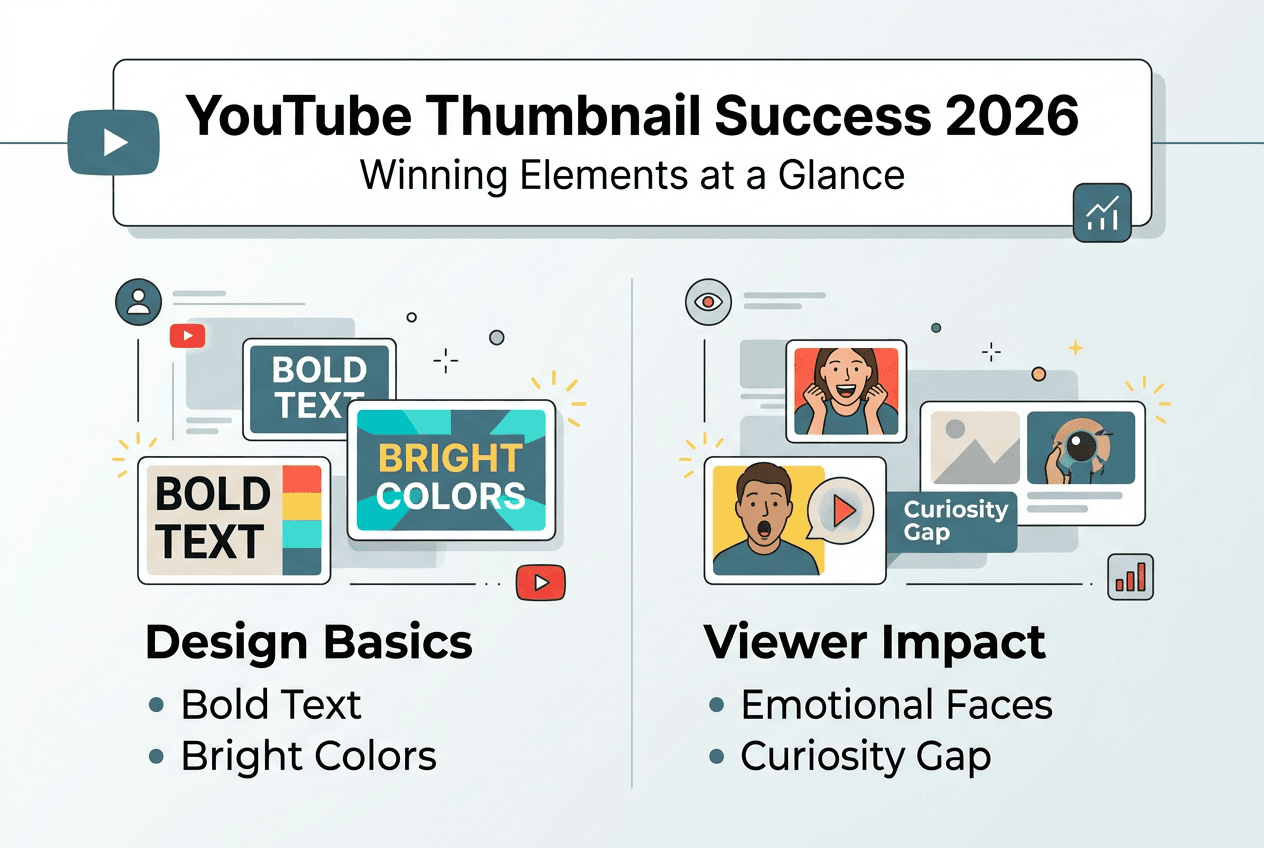
Text on thumbnails must follow strict rules to maximize impact. Use 3-6 large, bold words in clean, sans-serif fonts that remain readable at any size. Text readability accounted for 68% of CTR variance in comprehensive testing, proving that fancy decorative fonts actively hurt performance. Your text should complement the visual, not compete with it, creating a unified message that viewers grasp instantly.
Color choices dramatically affect whether viewers notice your thumbnail in crowded feeds. High-contrast color combinations outperformed pastels by 127% in click-through testing, demonstrating that bold visual statements cut through the noise. Bright yellows against deep blues, vivid reds against black backgrounds, or electric greens against white create eye-catching contrasts that make scrolling thumbs pause. Avoid muddy middle tones and subtle gradients that blend into the background.
Human faces with strong emotional expressions create instant connections with viewers. Eyes looking directly at the camera establish psychological engagement, while expressions of surprise, excitement, curiosity, or concern trigger mirror neurons that make viewers feel the emotion. This biological response happens before conscious thought, making emotional faces one of the most reliable thumbnail elements for capturing attention. Even channels without on-camera personalities can incorporate reaction imagery strategically.

Curiosity gaps bridge the space between what viewers know and what they want to discover. Emotional triggers increased CTR by 83% when properly deployed, proving that psychological hooks outperform straightforward descriptions. Create tension by showing a problem without the solution, displaying a surprising result without the method, or presenting a question without the answer. This strategic incompleteness makes clicking feel necessary rather than optional.
Pro Tip: Place the most important visual element in the center-left of your thumbnail, where eyes naturally land first when scanning content feeds.
Mobile optimization requires ruthless simplification. Every element must serve a clear purpose, and anything that doesn't directly contribute to the click decision should be eliminated. Busy backgrounds, multiple competing focal points, and excessive detail all reduce effectiveness on small screens. The best mobile thumbnails use one strong image, one emotional element, and minimal text to create instant clarity. Advanced techniques for balancing these elements are covered in our YouTube thumbnail tips expert guide.
Custom versus auto-generated thumbnails: what the numbers say
The performance gap between custom and auto-generated thumbnails reveals why successful creators invest time in design. Videos with custom thumbnails achieve 20-40% higher CTR compared to auto-generated options, translating to thousands of additional views over a video's lifetime. Auto-generated frames capture random moments that rarely represent your content's value, while custom designs strategically showcase the most compelling aspects.
Human designers incorporate emotional intelligence that current AI cannot fully replicate. Understanding which facial expressions resonate with specific audiences, how cultural context affects color perception, and which curiosity gaps drive clicks requires nuanced judgment. AI-generated thumbnails averaged 3.2% CTR while human-optimized designs achieved 8.7% CTR, demonstrating that strategic human input more than doubles effectiveness.
| Thumbnail Type | Average CTR | Design Time | Customization Level |
|---|---|---|---|
| Auto-generated | 2-4% | 0 minutes | None |
| Basic AI | 3-5% | 2-5 minutes | Limited |
| Human-optimized AI | 7-9% | 10-15 minutes | High |
| Professional custom | 8-12% | 30-60 minutes | Complete |
Channels with consistent custom thumbnails build stronger brand recognition over time. Viewers begin associating specific visual styles with quality content, creating a trust shortcut that increases click likelihood. This brand equity becomes self-reinforcing: familiar thumbnails get clicked more often, which trains the algorithm to show your content to more viewers, which exposes more people to your visual brand. The compounding effect makes early investment in consistent design pay dividends for years.
AI tools serve best as starting points rather than final solutions. They can generate base compositions, suggest color schemes, and provide multiple options quickly. However, the critical optimization step requires human judgment about audience psychology, platform trends, and brand consistency. Successful creators use AI to accelerate the creative process, then apply strategic refinements that align with proven performance principles.
Pro Tip: Create a thumbnail template with your brand colors and fonts, then customize it for each video to maintain consistency while allowing topic-specific variations.
The long-term promotion benefits of custom thumbnails extend beyond individual video performance. Channels that consistently deliver high-quality thumbnails train their audience to expect value, reducing the friction for future clicks. This accumulated trust becomes a competitive moat that protects against algorithm changes and market saturation. For tools that combine AI efficiency with customization power, check out the best AI thumbnail generators available today.
Practical tips to create thumbnails that maximize YouTube video promotion
Testing thumbnails at actual mobile size before uploading prevents the most common design failures. Export your design and view it on your smartphone at the exact dimensions YouTube displays in feeds. If you can't read the text or identify the main subject instantly, neither can your audience. This simple quality check catches problems that desktop previews miss, saving you from uploading thumbnails that fail where 70% of viewers will see them.
- Limit text to 3-5 concise, impactful words that complement rather than repeat your title. Viewers can read titles, so use thumbnail text to add context or create curiosity rather than duplicating information.
- Use bright, contrasting colors that stand out against YouTube's white or dark interface backgrounds. Test your thumbnail against both light and dark modes to ensure visibility in all viewing contexts.
- Include emotional human faces when possible, positioning them to make direct eye contact with viewers. This psychological connection happens subconsciously and dramatically increases engagement.
- Avoid clickbait tactics that misrepresent your content. Swapping cluttered designs for high-contrast, simple versions increased CTR by 2% while maintaining viewer trust and watch time.
- Develop a consistent thumbnail style using the same fonts, color schemes, and layout patterns. This visual signature helps viewers instantly recognize your content in crowded feeds.
Color psychology plays a significant role in thumbnail performance. Red and orange create urgency and excitement, making them effective for time-sensitive or high-energy content. Blue and green convey trust and calm, working well for educational or problem-solving videos. Yellow grabs attention but can appear cheap if overused. Black and white provide sophistication and contrast. Understanding these associations helps you choose colors that reinforce your content's emotional message.
Pro Tip: Create three thumbnail variations for each video and A/B test them using YouTube's thumbnail testing feature to discover what resonates most with your specific audience.
Face positioning affects viewer perception in subtle but measurable ways. Faces looking toward the center of the thumbnail create a closed composition that feels complete. Faces looking outward suggest there's more to discover, creating curiosity. Faces looking directly at the camera establish connection and authority. Experiment with these orientations to find what drives the best results for your content type and audience demographics.
Consistency doesn't mean monotony. Establish visual rules for your thumbnails, like always using the same font for text overlays or maintaining a consistent color palette, then allow flexibility in composition and imagery. This balance creates recognizable branding while preventing viewer fatigue from repetitive designs. Your thumbnail style should evolve gradually as your channel grows, maintaining core elements while refining based on performance data. Explore advanced optimization strategies in our creating YouTube thumbnails guide and YouTube thumbnail tips expert guide.
Boost your YouTube success with expert thumbnail tools
Creating thumbnails that implement these evidence-backed strategies becomes significantly easier with the right tools. Our AI-powered platform streamlines the process of crafting high-contrast, readable thumbnails that capture attention and drive clicks. You don't need graphic design experience to produce professional results that compete with top creators.
Combining human creativity with AI efficiency gives you the best of both worlds. Generate multiple design options in seconds, then apply strategic refinements based on the performance principles covered in this guide. Our platform makes it simple to test different approaches, iterate quickly, and discover what resonates with your specific audience. Whether you're launching a new channel or optimizing an established one, having the right thumbnail creation tools accelerates your path to better click-through rates and channel growth.
Access expert tips and templates that codify best practices into reusable frameworks. Start with proven designs, customize them for your brand and content, and maintain consistency across your channel. Our tools support creators at every level, from beginners needing guidance to experienced YouTubers seeking efficiency. Explore the best AI thumbnail generators to find solutions that match your workflow, or dive into our comprehensive YouTube thumbnail tips guide and YouTube thumbnail creation guide for detailed strategies.
Frequently asked questions
What is CTR and why is it crucial for YouTube promotion?
CTR means click-through rate, calculated as the percentage of people who click your video after seeing its thumbnail in search results, recommendations, or feeds. This metric directly influences how YouTube's algorithm evaluates your content quality and determines whether to promote it to wider audiences. Higher CTR signals that viewers find your content appealing, triggering increased impressions in recommended sections and search rankings. Even small CTR improvements compound over time, as better algorithmic placement exposes your thumbnails to exponentially more potential viewers.
Can I rely solely on AI to create effective YouTube thumbnails?
AI provides a valuable starting point for thumbnail creation but strategic human optimization dramatically improves performance. AI-generated thumbnails averaged 3.2% CTR while human-optimized designs achieved 8.7% CTR, demonstrating that combining both approaches yields the best results. AI excels at generating base compositions and suggesting color schemes quickly, while human judgment adds the psychological insights, brand consistency, and audience-specific refinements that drive exceptional click-through rates. Use AI to accelerate your workflow, then apply the strategic principles from our creating YouTube thumbnails guide to maximize effectiveness.
What common mistakes should I avoid when designing thumbnails?
Avoid misleading thumbnails that promise content you don't deliver, as clickbait thumbnails get algorithm deprioritization and damage long-term channel performance. Don't overload designs with excessive text, multiple competing focal points, or cluttered backgrounds that become illegible on mobile devices. Ensure your thumbnails remain clear and impactful at small sizes by testing them on actual smartphones before uploading. Misalignment between thumbnail promises and video content destroys viewer trust and watch time, both critical metrics for YouTube's promotion algorithm. Follow proven design principles in our YouTube thumbnail tips expert guide to avoid these pitfalls.
How important is thumbnail consistency for channel branding?
Consistency in thumbnail design builds brand recognition and makes your channel instantly identifiable to viewers browsing crowded feeds. Using consistent fonts, color schemes, and layout patterns creates a visual signature that loyal viewers recognize immediately, increasing click likelihood from your existing audience. This familiarity also signals professionalism to new viewers, building trust before they even watch your content. Consistent branding strengthens algorithmic performance by training YouTube to understand your content category and audience, improving recommendation accuracy and reach over time.