

YouTube thumbnails are often dismissed as mere clickbait tools, but this view misses their deeper purpose. A well-crafted thumbnail doesn't just attract clicks; it sets the stage for meaningful viewer interaction and ongoing community participation. When you understand how thumbnails shape audience expectations and emotional responses, you unlock a powerful lever for building loyalty and engagement. This guide explores the connection between thumbnail design and community engagement, plus how AI tools can streamline your creative process to deliver consistent, high-quality results that resonate with your audience.
Table of Contents
- Key takeaways
- Understanding how thumbnails influence community engagement
- How AI tools revolutionize thumbnail creation for faster viewer engagement
- Comparing thumbnail styles and their impact on community response
- Step-by-step approach to creating thumbnails that foster lasting community engagement
- Enhance your YouTube thumbnails with powerful AI tools
- FAQ
Key Takeaways
| Point | Details |
|---|---|
| Engagement impact | Thumbnails set viewer expectations, build trust, and encourage likes, comments, shares, and subscriptions by signaling tone and quality before play. |
| Honest signaling | A thumbnail that balances intrigue with honesty signals professionalism, reduces misperception, and invites viewers to engage with content they expect. |
| Consistent branding | Recognizable thumbnail style across videos fosters familiarity, loyalty, and a higher likelihood of clicking, watching, and participating in the community. |
| AI speed and customization | AI thumbnail tools speed up design by generating multiple options instantly and allow personalization to match the channel branding. |
Understanding how thumbnails influence community engagement
Your thumbnail is the first visual handshake between your content and potential viewers. It communicates tone, topic, and quality before anyone clicks play. Thumbnails significantly contribute to video discoverability and shape whether viewers decide to invest their time. But the impact goes beyond initial clicks. A thumbnail that accurately represents your video content builds trust, encouraging viewers to return, comment, and share.
Community engagement includes every participatory action viewers take: likes, comments, shares, and subscriptions. These behaviors stem from emotional and cognitive responses triggered by visual cues. When your thumbnail aligns with viewer expectations and delivers on its promise, you create positive reinforcement. Viewers feel satisfied, understood, and more likely to engage. Conversely, misleading or generic thumbnails erode trust and discourage interaction.
Effective thumbnails balance intrigue with honesty. They highlight the video's core value without overpromising. Consider how facial expressions, color contrast, and text clarity work together to signal professionalism and relevance. A thumbnail featuring genuine emotion or curiosity invites viewers into a story they want to join. When viewers feel connected to your content from the first glance, they're more inclined to participate in your community through active engagement.
Consistency matters enormously. When viewers recognize your thumbnail style across videos, they develop familiarity and loyalty. This visual branding becomes shorthand for quality and reliability. Over time, consistent thumbnails train your audience to spot your content instantly, increasing the likelihood they'll click, watch, and engage. The relationship between thumbnail design and community engagement is cyclical: better thumbnails attract engaged viewers, and engaged viewers amplify your reach through their interactions.
Pro Tip: Analyze your top-performing videos to identify common thumbnail elements that resonate with your audience. Replicate those visual patterns while keeping content fresh to maintain engagement momentum.
How AI tools revolutionize thumbnail creation for faster viewer engagement
Creating compelling thumbnails traditionally required design skills, expensive software, and significant time investment. AI tools have transformed this landscape entirely. Modern AI thumbnail generators offer both free and paid options that democratize access to professional-quality designs. These platforms analyze trending visual patterns, suggest optimal layouts, and automate technical adjustments like color correction and text positioning.
Speed is a game changer for busy creators. What once took 30 minutes per thumbnail now takes seconds. AI tools provide templates based on your content category, audience demographics, and current design trends. You input basic information about your video, and the system generates multiple thumbnail options instantly. This efficiency lets you focus on content creation rather than design mechanics, accelerating your publishing schedule without sacrificing visual quality.
Personalization remains crucial despite automation. The best AI tools allow customization of generated thumbnails to match your channel's unique branding. You can adjust color schemes, font choices, and layout elements to maintain visual consistency across your content library. This balance between automation and customization ensures your thumbnails feel both professional and authentic. Viewers recognize your style while benefiting from the polish AI provides.
AI also helps optimize thumbnails for different devices and platforms. Algorithms test how thumbnails appear on mobile screens, desktop browsers, and smart TVs, ensuring readability across viewing contexts. Some advanced tools even predict engagement potential by comparing your design against high-performing thumbnails in your niche. This data-driven approach removes guesswork and helps you make informed decisions about visual elements that drive community interaction.
Pro Tip: Use AI suggestions as your starting point, then customize facial expressions, text emphasis, and brand colors to retain uniqueness. The combination of AI efficiency and human creativity produces thumbnails that stand out while maintaining your authentic voice.
Comparing thumbnail styles and their impact on community response
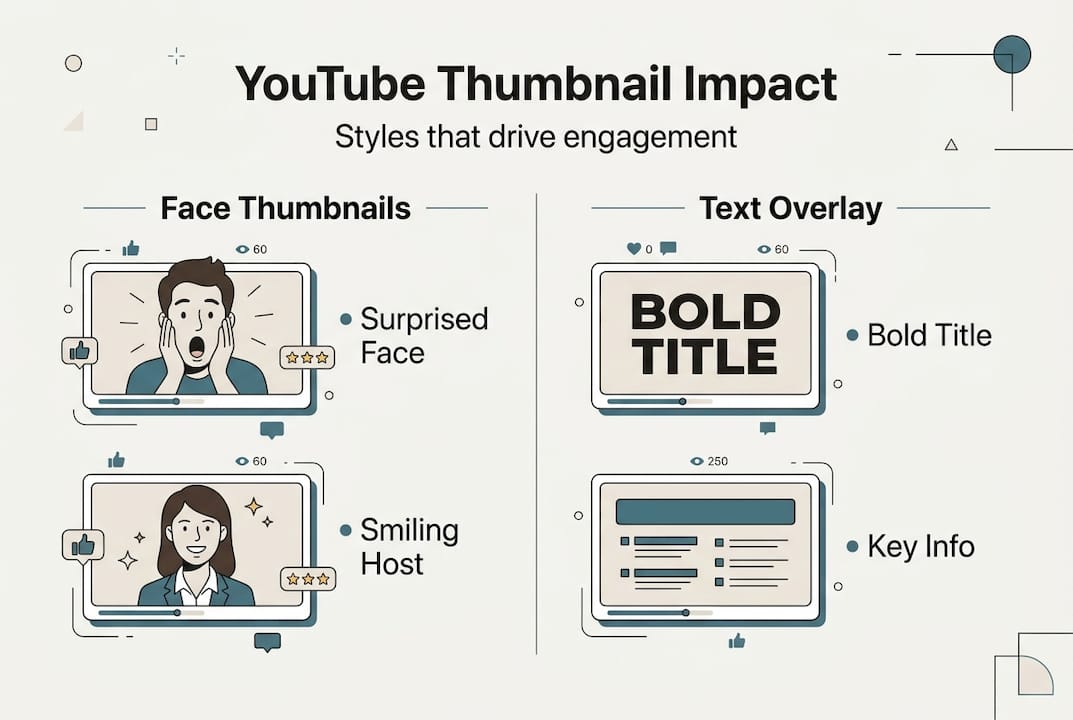
Different thumbnail styles trigger distinct emotional and cognitive responses. Understanding these patterns helps you choose designs that align with your content goals and audience preferences. Certain thumbnail styles generate higher engagement due to their emotional and visual appeal. The four dominant styles each serve specific purposes and connect with viewers differently.
Close-up face thumbnails leverage human psychology. Viewers naturally gravitate toward facial expressions, especially those showing surprise, curiosity, or excitement. This style works exceptionally well for reaction videos, personal vlogs, and tutorial content where personality drives engagement. The emotional connection fostered by expressive faces encourages viewers to comment and share their own reactions.

Bright text overlay thumbnails prioritize clarity and information. Large, bold text communicates your video's value proposition instantly. This approach suits educational content, how-to guides, and list-based videos where viewers seek specific information. The directness appeals to goal-oriented viewers who engage through questions and knowledge sharing in comments.
| Thumbnail Style | Best For | Engagement Type | Key Elements |
|---|---|---|---|
| Close-up faces | Vlogs, reactions, personal content | Emotional comments, shares | Expressive emotions, eye contact |
| Bright text overlays | Tutorials, how-tos, educational | Question-based comments | High contrast, readable fonts |
| Minimalistic | Tech reviews, professional content | Thoughtful discussions | Clean design, focused subject |
| Thematic collages | Entertainment, compilations | Likes, casual engagement | Multiple visual elements, color harmony |
Minimalistic thumbnails project sophistication and professionalism. They use negative space, subtle colors, and focused subjects to convey quality and expertise. This style attracts viewers seeking in-depth analysis or premium content. Engagement tends toward longer, more thoughtful comments from dedicated community members.
Thematic collage thumbnails combine multiple visual elements to suggest variety and entertainment value. They work well for compilation videos, entertainment content, and broad-appeal topics. While they may generate higher view counts, engagement depth can vary. These thumbnails attract casual viewers who engage through likes and brief comments rather than extended discussions.
Consider these factors when selecting your style:
- Color contrast affects readability and emotional impact
- Facial expressions create immediate emotional connections
- Text size determines mobile viewability and message clarity
- Background complexity influences focus and professional perception
Step-by-step approach to creating thumbnails that foster lasting community engagement
Building thumbnails that drive sustained engagement requires a systematic approach combining research, creation, and iteration. Stepwise thumbnail creation combining strategy and AI tools yields the highest engagement. Follow this process to develop thumbnails that resonate with your community and encourage ongoing interaction.
-
Research audience preferences for visual style and tone. Examine your analytics to identify which thumbnails generated the most comments, shares, and returning viewers. Study successful creators in your niche to spot visual patterns that resonate. Pay attention to color schemes, composition styles, and text approaches that align with your content category. This research phase prevents guesswork and grounds your design decisions in data.
-
Use AI tools to generate draft thumbnails based on best practices. Input your video topic, target keywords, and preferred style into an AI thumbnail generator. Review multiple options and select designs that capture your content's essence while standing out visually. AI suggestions incorporate current trends and proven design principles, giving you a strong foundation to build upon.
-
Customize key elements such as facial expressions and text clarity. Adjust the AI-generated thumbnail to reflect your unique brand identity. Modify facial expressions to match your video's emotional tone. Refine text for maximum readability on small screens. Adjust colors to maintain consistency with your channel's visual branding. This customization step ensures your thumbnail feels authentically yours rather than generic.
-
Test thumbnails with your community to gather feedback. Share thumbnail options with trusted viewers or community members through social media polls or community posts. Ask specific questions about clarity, appeal, and whether the thumbnail accurately represents the content. This feedback loop helps you understand what resonates before publishing.
-
Refine and maintain consistency for brand recognition. Implement feedback and establish visual guidelines for future thumbnails. Create a style guide documenting your preferred fonts, color palettes, and composition rules. Consistency builds recognition, making your content instantly identifiable in crowded feeds and recommendation algorithms.
Pro Tip: Monitor engagement metrics regularly to iterate thumbnail strategies effectively. Track not just views but also watch time, comments, and shares. If a thumbnail style consistently drives higher engagement, incorporate those elements into future designs while keeping content fresh.
Enhance your YouTube thumbnails with powerful AI tools
Transforming your thumbnail strategy starts with the right tools and knowledge. Our platform simplifies creating eye-catching thumbnails that engage your audience and drive meaningful interactions. Whether you're just starting or looking to optimize your existing approach, we provide the resources you need to succeed.
Explore our comprehensive comparison of AI thumbnail generator options to find the perfect fit for your channel's needs and budget. From free tools for beginners to advanced paid platforms for established creators, we break down features, pricing, and performance to help you make informed decisions. Access our detailed YouTube thumbnail tips guide featuring expert strategies for maximizing click-through rates and viewer engagement. Learn how to implement proven design principles that resonate with your specific audience. Follow our step-by-step YouTube thumbnail creation guide to master the complete process from concept to publication, ensuring every thumbnail contributes to your community-building goals.
FAQ
What makes a YouTube thumbnail effective for community engagement?
Effective thumbnails combine clarity, emotional appeal, and relevance to the video content. They set viewer expectations honestly and invite participation through visual storytelling. When thumbnails accurately represent your content while sparking curiosity, viewers feel satisfied after watching and are more likely to comment, share, and return for future videos.
Can AI tools create thumbnails that reflect my channel's unique style?
Many AI tools offer editable templates enabling style personalization. You can customize colors, fonts, layouts, and visual elements to align with your channel's identity. Customization ensures thumbnails maintain your brand consistency while benefiting from AI efficiency and design optimization. The best approach combines AI-generated foundations with your creative adjustments.
How often should I update thumbnails to maintain viewer engagement?
Update thumbnails based on performance metrics and content shifts. If a video underperforms despite quality content, testing a new thumbnail can revive engagement. For evergreen content, refreshing thumbnails every six to twelve months helps maintain relevance. Regular analysis of click-through rates and engagement patterns guides when updates will provide the most benefit.
Do different content types require different thumbnail approaches?
Absolutely. Educational content benefits from clear text and informational layouts, while entertainment videos thrive with expressive faces and dynamic compositions. Tutorial videos need thumbnails highlighting specific outcomes or transformations. Gaming content often uses action shots or character close-ups. Match your thumbnail style to both your content type and audience expectations for maximum engagement.
How can I measure if my thumbnails are improving community engagement?
Track metrics beyond views, including watch time percentage, comment count, like-to-view ratio, and share frequency. Compare these metrics across videos with different thumbnail styles to identify patterns. YouTube Analytics provides detailed data on traffic sources and viewer behavior. Thumbnails that drive engagement typically show higher retention rates and more active comment sections within the first 48 hours after publishing.