

Your YouTube video could be incredible, but without an eye-catching thumbnail, it might never get the views it deserves. Most creators spend hours perfecting their content yet barely five minutes on the thumbnail that determines whether anyone clicks. This oversight costs you impressions, engagement, and growth. The good news? Creating compelling thumbnails doesn't require professional design skills anymore. With the right approach and modern AI tools, you can craft thumbnails that stop scrollers mid-feed and turn casual browsers into loyal viewers. This guide walks you through proven thumbnail strategies that work in 2026.
Table of Contents
- Preparation: What You Need Before Creating Your Thumbnail
- Execution: Step-By-Step Best Practices For Designing Effective Thumbnails
- Verification: Optimizing And Measuring Thumbnail Performance
- Enhance Your Thumbnails With AI-Powered Tools
- Frequently Asked Questions About YouTube Thumbnail Creation Best Practices
Key takeaways
| Point | Details |
|---|---|
| Custom thumbnails drive clicks | Creators who invest time in thumbnail design see 20-40% higher CTR than those using auto-generated options. |
| Consistency builds recognition | Using a signature style with high-contrast colors helps viewers instantly identify your content in crowded feeds. |
| Faces create connection | Direct eye contact and expressive faces in thumbnails naturally draw more attention and encourage clicks. |
| AI levels the playing field | Modern AI tools enable creators without design experience to generate professional thumbnails in seconds. |
Preparation: what you need before creating your thumbnail
Before you open any design software or AI tool, gather your resources and plan your approach. Start by collecting high-quality images from your video. Screenshots work, but dedicated photos shot with good lighting deliver better results. Your subject should be clearly visible with minimal background distractions.
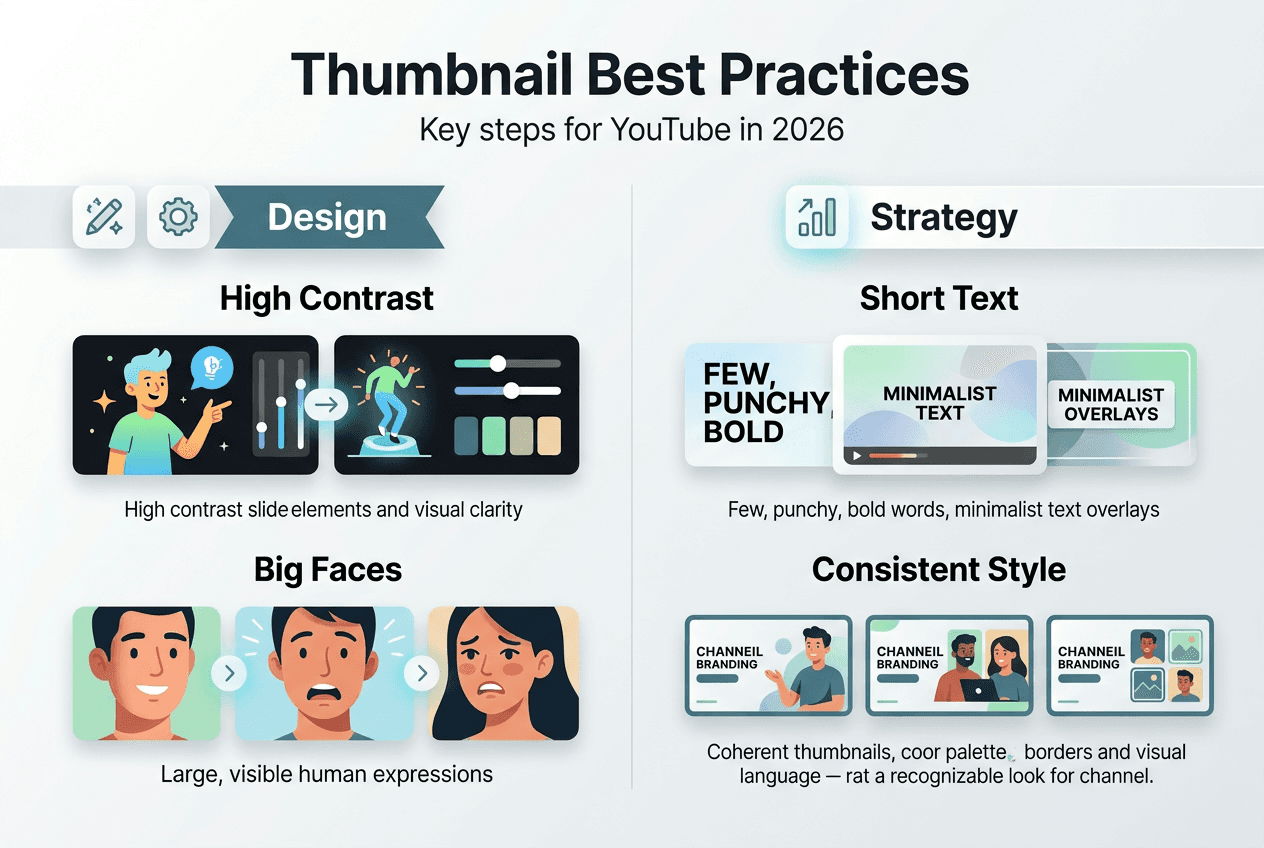
Next, define your thumbnail style. Successful channels maintain visual consistency that helps viewers recognize content instantly. Choose a color palette, font style, and layout approach you'll use repeatedly. This signature look becomes part of your brand identity.
Select tools that match your skill level. Professional designers might prefer Photoshop or Canva Pro, but creators without design backgrounds can leverage AI thumbnail generators that produce quality results without technical knowledge. Our step-by-step AI thumbnail creation guide walks through multiple options.
Understand YouTube's technical requirements:
- Resolution: 1280x720 pixels minimum (16:9 aspect ratio)
- File size: Under 2MB
- Format: JPG, GIF, or PNG
- Safe area: Keep critical elements away from edges
Pro Tip: Save your thumbnail templates and design elements in an organized folder system. This speeds up future creation and maintains consistency across your channel.
Recognize where thumbnails matter most. Custom thumbnails significantly impact performance in YouTube's homepage, suggested videos, and search results. However, thumbnails play a minimal role in the Shorts feed, where the video's opening frame matters more. Focus your thumbnail optimization efforts on longer-form content where creators who invest time in thumbnail design see 20-40% higher CTR than those using auto-generated thumbnails.
| Tool Type | Best For | Skill Level Required |
|---|---|---|
| AI Generators | Quick creation, no design experience | Beginner |
| Canva | Template-based design with customization | Beginner to Intermediate |
| Photoshop | Full creative control and advanced editing | Advanced |
| Mobile Apps | On-the-go editing and quick adjustments | Beginner |
Execution: step-by-step best practices for designing effective thumbnails
Start with a strong foundational image. Your base photo should feature clear subjects with good lighting and minimal clutter. If using a face, capture an expressive emotion that matches your video's tone. Excitement, surprise, curiosity, or determination all work depending on context.

Apply high-contrast principles immediately. High contrast is non-negotiable as the best thumbnails always have a strong visual separation between the subject and the background. Boost saturation and adjust brightness to make your subject pop. Use complementary colors that naturally draw the eye.
Incorporate faces strategically. Human brains are wired to notice faces, and a face in your thumbnail will get more attention than anything else. Position faces to make direct eye contact with viewers. This creates an instant connection that increases click probability.
Follow this creation sequence:
- Select your strongest image showing clear emotion or action
- Adjust contrast and saturation to create visual separation
- Add a colored background or gradient if needed for pop
- Insert text overlays with large, bold, readable fonts
- Keep text to 3-6 words maximum for mobile readability
- Add subtle borders or shadows to text for legibility
- Review at small size to ensure clarity on mobile devices
- Export in recommended format and resolution
Craft compelling text overlays that create curiosity gaps. For educational content, tease the outcome without revealing the method. For entertainment, hint at the payoff without spoiling the moment. Keep text large enough to read on phone screens, typically 60+ point fonts.
Pro Tip: Test your thumbnail by viewing it at actual size on your phone. If you can't read the text or identify the subject in two seconds, simplify your design.
Avoid common mistakes that kill click-through rates:
- Cluttered compositions with too many elements
- Text too small to read on mobile devices
- Low-contrast color combinations that blend together
- Misleading images that don't match video content
- Inconsistent branding across your channel
- Generic stock photos instead of custom imagery
For different content types, adjust your approach. Tutorial videos benefit from before/after comparisons. Vlogs perform well with expressive close-up faces. List videos should prominently display the number. Product reviews work best showing the product clearly with your reaction.
Our YouTube thumbnail tips 2026 resource provides specific examples for each content category with visual comparisons.
| Design Element | Optimal Approach | Why It Works |
|---|---|---|
| Color Contrast | Complementary colors with high saturation | Creates visual separation and draws attention |
| Text Size | 60+ point fonts, 3-6 words maximum | Ensures mobile readability and quick comprehension |
| Facial Expression | Direct eye contact with strong emotion | Triggers psychological response and connection |
| Background | Solid color or subtle gradient | Prevents distraction from main subject |
Verification: optimizing and measuring thumbnail performance
Your thumbnail's real test happens after publishing. YouTube Analytics reveals exactly how your design performs. Navigate to the Reach tab and examine your click-through rate closely. This metric shows the percentage of impressions that converted to views.
What constitutes a good CTR? YouTube considers this relative to your channel size and niche, but generally:
- 2-4% is average for most channels
- 4-6% indicates strong performance
- Above 6% suggests exceptional thumbnail effectiveness
- Below 2% signals need for immediate optimization
Dig deeper into traffic sources. Videos with higher CTRs are more likely to be pushed in Suggested and Browse traffic, making this metric crucial for growth. Pay special attention to homepage performance, where custom thumbnails increased CTR by 140% compared to auto-generated options.
Implement systematic testing to refine your approach. Create variations of successful thumbnails and monitor which elements drive better performance. Test one variable at a time: color schemes, text placement, facial expressions, or background styles.
Pro Tip: YouTube allows thumbnail changes after publishing. If a video underperforms in its first 48 hours, try a new thumbnail design and monitor whether CTR improves.
Monitor these key performance indicators:
- Impressions: How often your thumbnail appears
- CTR: Percentage of impressions that become views
- Average view duration: Whether thumbnail accurately represents content
- Traffic sources: Which placements drive most clicks
- Audience retention: If viewers stay after clicking
Watch for misleading thumbnail syndrome. If your CTR is high but average view duration drops quickly, your thumbnail might overpromise. This damages long-term performance as YouTube's algorithm recognizes the disconnect.
For Shorts content, remember thumbnails play a minimal role in the primary Shorts feed. Viewers scroll through actual video frames, not static thumbnails. However, Shorts thumbnails still matter when content appears in search results, suggested videos, or channel pages.
Schedule monthly thumbnail audits. Review your last 10-20 videos and identify patterns. Which thumbnail styles consistently outperform others? What common elements appear in your top performers? Use these insights to refine your standard approach.
Our AI thumbnail creation guide includes specific optimization techniques based on analytics data, helping you continuously improve results.
| Metric | What It Reveals | Action Threshold |
|---|---|---|
| CTR Below 2% | Thumbnail not compelling enough | Redesign immediately |
| High CTR, Low Retention | Thumbnail misleads viewers | Adjust to match content better |
| Low Impressions | Content not being recommended | Focus on SEO and consistency |
| Declining CTR Over Time | Audience fatigue with style | Refresh thumbnail design approach |
Enhance your thumbnails with AI-powered tools
Creating compelling thumbnails no longer requires years of design experience or expensive software. Modern AI tools democratize professional-quality thumbnail creation, letting you generate eye-catching designs in seconds. Whether you're launching your first channel or optimizing an established presence, AI-powered solutions match your skill level and timeline.
Explore the best AI thumbnail generator 2026 options tailored specifically for YouTube creators. These tools analyze successful thumbnail patterns and apply proven design principles automatically. Get expert guidance through our YouTube thumbnail tips expert guide, featuring current trends and optimization strategies. For hands-on learning, follow our AI thumbnail creation step-by-step tutorial that walks through the entire process from concept to upload.
Frequently asked questions about YouTube thumbnail creation best practices
What size and resolution should YouTube thumbnails be?
YouTube recommends 1280x720 pixels minimum with a 16:9 aspect ratio. Keep file size under 2MB and use JPG, PNG, or GIF format. This resolution ensures clarity across all devices from phones to desktop displays.
Can AI tools fully replace manual thumbnail design?
AI tools excel at generating professional thumbnails quickly, especially for creators without design skills. However, manual refinement often improves results by adding personal branding touches and ensuring perfect alignment with specific video content. Many successful creators use AI for initial generation then customize details.
Do thumbnails affect YouTube Shorts performance?
Thumbnails have minimal impact in the primary Shorts feed where viewers scroll through actual video frames. However, custom thumbnails still matter when Shorts appear in search results, suggested videos, channel pages, and external embeds. Focus thumbnail optimization efforts on longer-form content for maximum impact.
How often should I update my thumbnails?
Update thumbnails when videos underperform expectations within the first 48-72 hours after publishing. For older content, refresh thumbnails if CTR drops significantly or when rebranding your channel. Avoid changing thumbnails on well-performing videos unless testing specific improvements.
What emotions work best in thumbnail faces?
Surprise, excitement, curiosity, and determination consistently drive higher click-through rates. Match the emotion to your content type: tutorials benefit from confident expressions, entertainment content works with exaggerated reactions, and educational videos perform well with thoughtful or intrigued looks. Always ensure direct eye contact with the camera for maximum connection.